
Headless CMS vs traditional CMS is a decision many service businesses are making without a clear view of the three-year cost. Skymoon builds websites and runs SEO campaigns. We sell no CMS, have no affiliate relationship with any CMS vendor, and have no financial incentive to recommend headless over traditional. That is the reason to read this instead of relying only on vendor pages.
The decision between headless and traditional CMS architecture is being made badly at a lot of service businesses right now, because the people who produce most of the content about headless either sell it or sell expertise in it.
Is your website actually built to convert?
Twenty two checks covering Core Web Vitals, user experience, and conversion paths. The exact list we run before every website audit.
This post answers the question the vendor pages cannot answer honestly: what does a headless build actually cost a 20-person clinic, law firm, or home services company over three years, and when is the correct answer to stay traditional?
This post covers architecture and cost only. For the platform comparison (WordPress vs custom-built), see WordPress vs custom website. For CMS fundamentals, see what is web development.
What Is a Headless CMS? (60-Word Definition)
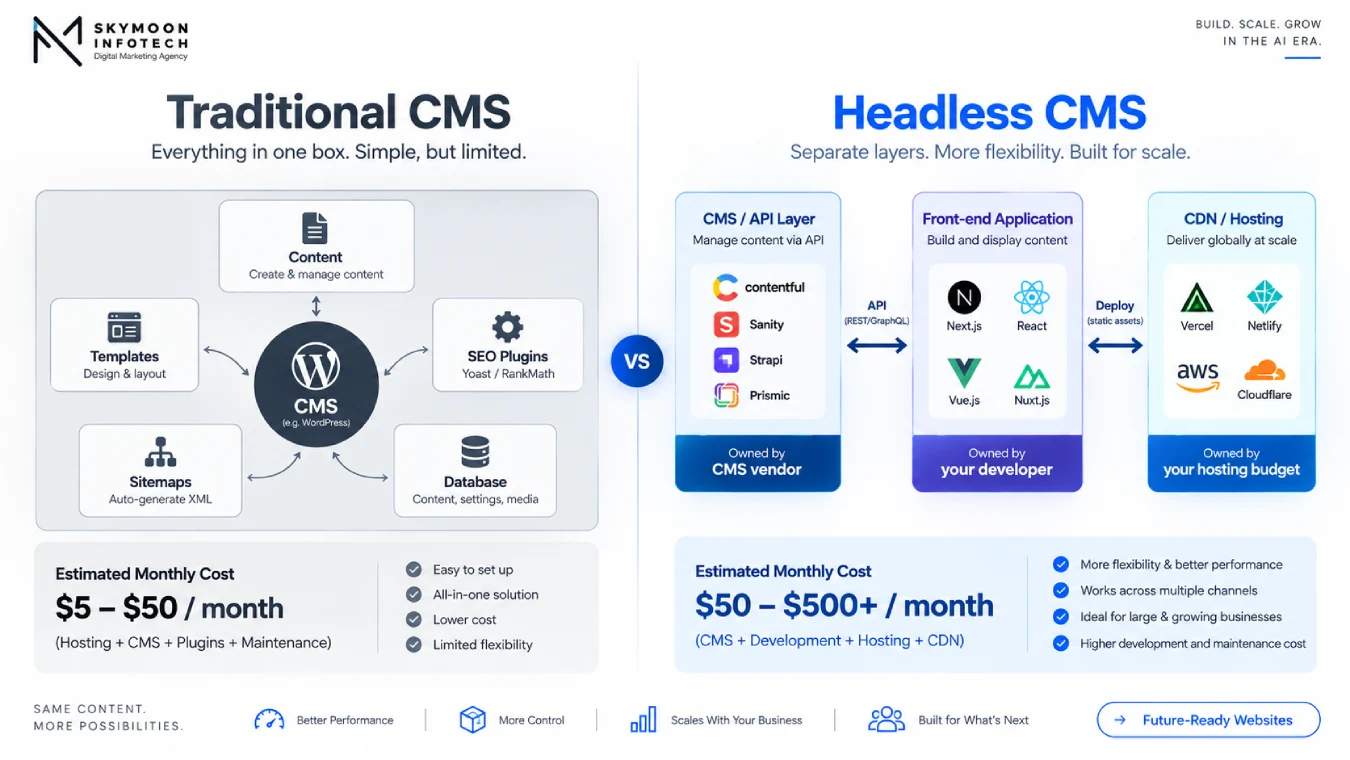
A headless CMS stores and manages your content and delivers it through an API. A traditional (monolithic) CMS manages content and also controls how it is displayed on your website.
In headless architecture, a separate front-end application consumes the API and renders the pages. You gain flexibility in how content is delivered. You lose the built-in display layer, and everything that was bundled with it.
A decoupled CMS vs headless CMS: the two are often used interchangeably but are technically different. Decoupled CMS separates content and presentation while retaining some templating conventions.
Headless CMS delivers content only via API with no presentation layer at all. In most commercial comparisons, the distinction is academic; the term “headless” is used for both. “API-first CMS” means the same thing as headless in most commercial contexts.
Headless CMS vs Traditional CMS: Quick Comparison
The comparison below covers the dimensions that matter for a service business. Whether you frame it as headless cms vs traditional cms or traditional cms vs headless cms, the decision axes are the same: it is a consequence comparison, not a feature comparison.
| Dimension | Traditional CMS (e.g. WordPress, Squarespace) | Headless CMS (e.g. Sanity, Contentful, Strapi) | Who wins for a typical service business? |
|---|---|---|---|
| Setup cost | Low: theme plus plugins, often $500-$5,000 for a professional build | High: content modelling plus front-end build, $10,000-$50,000+ minimum | Traditional — by a wide margin at this scale |
| Monthly licence cost | $0-$100/mo (hosting plus domain) | $0-$900/mo CMS licence, separate from front-end hosting | Traditional — headless licence is often the smallest cost line, not the largest |
| Front-end hosting cost | Included in the CMS stack | Separate: Vercel/Netlify from $0-$40+/mo for small sites, more at scale | Traditional for simplicity; headless hosting cost is manageable |
| Developer retainer after launch | Low: most editor tasks need no developer | High: layout changes, new page types, and new fields need a developer | Traditional — the retainer is where headless gets expensive for service businesses |
| Editor experience | WYSIWYG: what you see is what publishes | Structured fields: editors see forms, not pages; live preview is a build task | Traditional — materially better for non-technical teams |
| SEO plumbing | Built in: Yoast/Rank Math, sitemaps, canonicals, redirects | Built by your team: every SEO feature is a code decision | Traditional — headless requires deliberate SEO engineering to replace what WP gives free |
| Performance ceiling | Good with caching; great with a well-optimised WP stack | Potentially better, because the front end is fully custom | Headless — but the ceiling is only reached with ongoing developer investment |
| Multi-channel content delivery | Website only | Website, app, kiosk, partner API, anywhere the front end goes | Headless — but irrelevant if you only have one website |
| Switching cost later | Low: move hosts, change themes, keep URLs | High: the front end and the CMS are both bespoke; rebuilding means starting again | Traditional — easier to exit if the business changes |
[SKYMOON INFOTECH ANALYSIS] The table above exposes the structural problem with most headless CMS vs traditional CMS comparisons: they compare the headline features (performance, flexibility, multi-channel) while omitting the consequence columns (developer retainer, SEO rebuild, switching cost).
The vendor pages are the source of the headline features. Nobody selling headless publishes the retainer line.
Do I Need a Headless CMS? Five Disqualifiers
Headless CMS earns its cost when the same content feeds several delivery destinations simultaneously, when a large editorial team is blocked by release cycles, or when front-end performance requirements exceed what any theme layer can deliver.
A service business with one website, two editors, and no app should run through these disqualifiers before a developer quotes the build.
Disqualifier 1: You have one website and no plans for a second channel in the next 24 months. The multi-channel content delivery that makes headless worth the infrastructure cost does not exist yet.
You are paying decoupling costs and collecting none of the decoupling benefits. Stay traditional until the second channel has a confirmed launch date.
Disqualifier 2: Your marketing team needs to create new page layouts without developer involvement. In a headless setup, layout lives in the front-end code, not the CMS.
Editors can edit content that already exists in the content model; they cannot create a new page structure, add a section, or move a component without a developer. If your marketing team currently does this in WordPress, they will lose that ability and the business will pay to have it done instead.
Disqualifier 3: Your business has fewer than five people who would directly benefit from a faster, more flexible website.
At this scale, the gap between a well-optimised traditional CMS and a headless build is invisible to visitors and immaterial to revenue. The cost of maintaining the headless stack is not invisible.
Disqualifier 4: You do not have, and do not plan to hire, a developer who can maintain the front-end codebase. A headless front end is a bespoke software application.
Plugins, CMS updates, and design changes that a traditional CMS handles through its admin panel all become code changes in a headless setup. If the developer who built it is unavailable, the site becomes unmaintainable.
Disqualifier 5: Your budget for the initial build is under $15,000-$20,000. Below that threshold, the content modelling, front-end build, and SEO plumbing that headless requires cannot be done properly.
The result is a partially-built headless site that has the cost structure of headless and the capability of a mid-tier theme. That is the worst outcome of the three.
[NOTE] None of these disqualifiers means headless is wrong. They mean the return on investment does not materialise for a service business at this scale, at this stage.
The same decision revisited when the business has an app, a partner API, or ten editors blocking each other on release cycles will produce a different answer.
Headless CMS Pricing: The Four Cost Lines Vendor Pages Never Show Together
Headless CMS cost discussions focus on the licence line because that is what the vendor controls. Three other cost lines are just as real and, in most service-business cases, larger over a three-year period. The table shows all four for a representative 40-60 page service business site.
[DATA] All ranges below are from independent 2026 sources, not vendor pricing pages.
CMS licence ranges verified from Nayan Kyada pricing comparison 2026 and cross-referenced against vendor pages.
Migration and build cost sourced from DevCritters 2026 WordPress-to-headless migration guide, ZTABS, and CSS Chopper 2026 verified agency ranges: $10,000-$50,000+ for a 40-60 page service business site with proper SEO handover. Developer retainer: $500-$2,000+/mo.
| Cost Line | Year 1 | Year 2 | Year 3 (cumulative 3-yr total) |
|---|---|---|---|
| CMS licence (managed, mid-tier)e.g. Sanity Growth or Strapi Cloud Pro | $600-$1,800/yr | $600-$1,800/yr | $1,800-$5,400 over 3 years |
| Front-end hosting (Vercel/Netlify)CDN, build minutes, bandwidth | $0-$480/yr (small site) | $0-$480/yr | $0-$1,440 over 3 years |
| Developer retainerfor layout changes, new fields, plugin-equivalent tasks | $6,000-$24,000/yr(1-2 days/month minimum) | $6,000-$24,000/yr | $18,000-$72,000 over 3 years — typically the largest line |
| Migration and initial buildone-time; amortised across the window | $10,000-$50,000 build + $8,000-$25,000 SEO redirect mapping if rankings are at risk | — | $18,000-$75,000 one-time cost |
| TOTAL 3-YEAR TCO | $16,600-$99,800 in year 1 (build + first year running costs) | $6,600-$26,280/yr | $37,800-$148,680 cumulative 3-year range |
The headless CMS total cost of ownership comparison with a traditional CMS becomes favourable when:
(a) The developer retainer replaces agency work that was already happening at a comparable cost.
(b) The front-end performance improvement is measurable in conversion rate or Core Web Vitals.
(c) The multi-channel delivery saves build cost for a second channel. None of these conditions applies to a service business running a single-site content operation.
Headless CMS SEO: What Your CMS Used to Do Free
When you move from WordPress to a headless CMS, you transfer every SEO feature that WordPress provided automatically into a list of build tasks someone must own.
Jottler’s headless CMS SEO guide (April 2026) put it plainly: “You lose Yoast, Rank Math, the built-in sitemap, the canonical URL plugin, the schema plugin, the image optimiser, and every other SEO convenience WordPress hands you in the first ten minutes.
None of that exists in Sanity or Contentful by default.” For the complete SEO-friendly build checklist, see how to build an SEO-friendly website.
For Core Web Vitals thresholds and their conversion implications, see the Core Web Vitals guide. This section covers only the SEO features that move from automatic to manual when you go headless.
| SEO Feature | Traditional CMS | Headless CMS |
|---|---|---|
| Meta titles and meta descriptions | Fields in every page admin screen; plugin manages length warnings and previews | Must be added to the content model as fields and rendered in the front-end document head server-side; missing = no meta on any page |
| Canonical tags | Auto-generated by the CMS or SEO plugin; prevents duplicate-content issues across pagination, tags, categories | Must be generated by the front-end routing logic; inconsistent routing creates duplicate-URL clusters that dilute ranking signals |
| XML sitemap | Auto-updates on publish; submitted to Search Console by the plugin | Build task: sitemap must be generated programmatically and must refresh on content change; common failure mode is a stale sitemap months after launch |
| Redirect management | Admin screen: 301 redirects set in the CMS interface; plugin maintains the redirect table | Code change: redirects are configuration in the front-end application or hosting platform; non-technical staff cannot add them |
| Schema / structured data | FAQPage, Article, LocalBusiness, BreadcrumbList via plugin; auto-generates from content | Build task: JSON-LD must be generated server-side for each content type; client-side injection is unreliable for indexing |
| Image optimisation | Auto-resize, WebP conversion via plugin or CDN layer | Front-end responsibility: Next.js Image or equivalent, plus CDN configuration; missing = slow hero images and CLS failures |
| Robots.txt and noindex tags | Managed via plugin; staging environments can be blocked at the CMS level | Configuration in front-end or hosting platform; preview environments accidentally indexing is a documented failure mode in headless setups |
| Visual preview of SEO changes | SERP snippet preview in the CMS editor | Usually absent or requires a custom build; editors publish without seeing how the page will appear in search results |
[SKYMOON INFOTECH ANALYSIS] In SEO audits on inherited headless projects, the most consistent finding is a sitemap that stopped updating six weeks after launch, canonical tags that are present on the homepage and absent on every subdirectory URL, and no redirect table at all – because the previous developer configured redirects at the hosting layer and nobody else knows how to add one.
These are not rare failures; they are what happens when a service business adopts headless without a named person who owns each row in the table above.
What Breaks When You Go Headless: The Six Things Nobody Mentions at the Pitch
The items below are not theoretical risks. They are what actually breaks in a headless migration for a service business, sourced from agency post-mortems and post-migration audits.
The vendor pages and comparison posts written by developer shops do not cover them because the people writing those posts are equipped to solve each one and assume their clients are too.
Visual Page Building and Live Preview
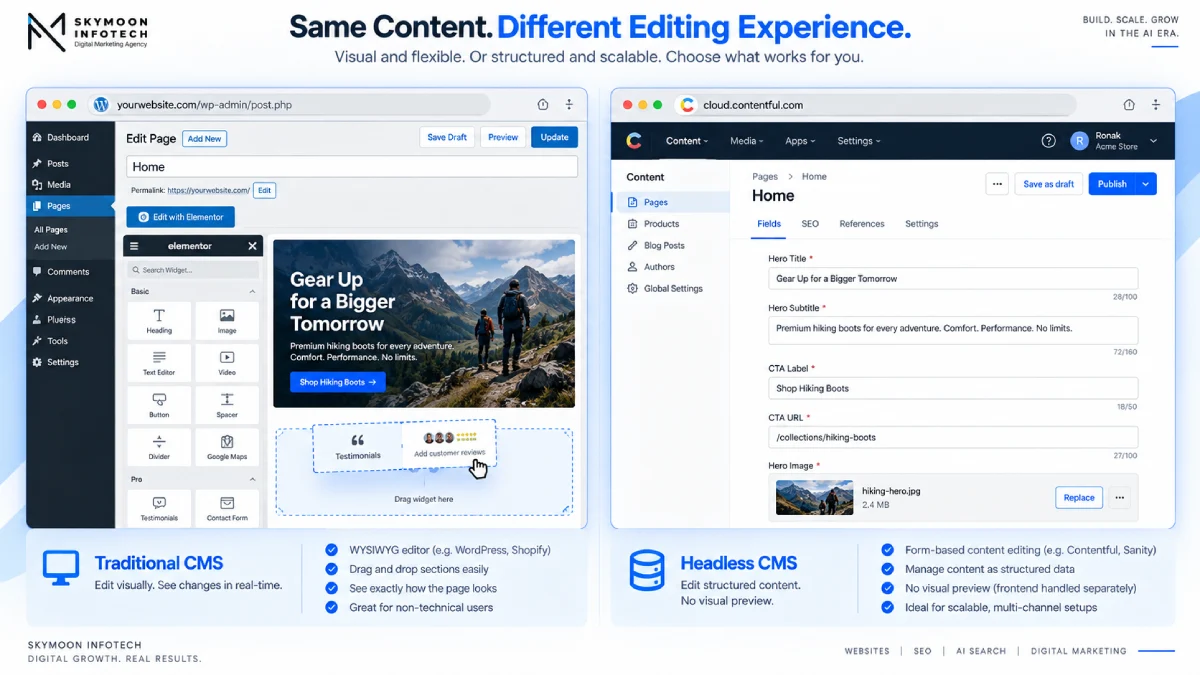
In WordPress, an editor drags sections, changes the layout, and sees the result before saving.
In a standard headless setup, editors fill in structured fields, submit, and see the result only after the front end has rebuilt or fetched the updated content.
Live preview exists in Storyblok, Sanity, and a few others, but it is a feature of the specific platform, and the visual editor it provides is scoped to the content types the developer built, not to the full page-building freedom of a page builder.
Creating a new page layout still requires a developer.
Forms and Spam Protection
WordPress handles forms through plugins (Gravity Forms, WPForms, Contact Form 7) that include spam protection, notification routing, CRM integrations, and conditional logic as part of the plugin.
In a headless build, forms are a separate application decision: a third-party service (Typeform, Formspree, Netlify Forms) or a custom implementation. Each brings its own cost, its own configuration, and its own integration work with the CRM or email platform the business uses.
This is a recurring surprise in service-business headless projects because forms are the primary conversion mechanism on most service websites.
Your website might be losing customers before they even scroll
Slow load times, confusing navigation, and weak calls to action quietly cost businesses real revenue every month. See exactly what yours is missing.
No commitment, just a clear picture of where you stand.
Front-End Plugin Ecosystem
WordPress has roughly 60,000 plugins. Most of the functionality service businesses use at the front end (social proof widgets, appointment booking, live chat, cookie consent, cookie-controlled analytics, GDPR consent flows) is available as a plugin that installs in minutes and requires no developer.
In a headless environment, each of these is either a third-party JavaScript embed or a custom build.
Third-party embeds usually still work; they just need to be added intentionally and tested in the front-end build rather than installed from the admin panel.
Redirect Management After Content Changes
When a URL structure changes, when a page is deleted, or when a campaign page is retired, someone needs to add a 301 redirect. In WordPress, that is a three-field form in the admin.
In a headless setup, it is a code change, a configuration file update, or an action in the hosting platform, depending on how redirects were implemented in the build. If the developer who built the site is unavailable, the redirect does not get added.
The content page returns a 404 and the ranking equity is lost. DevCritters, documenting WordPress-to-headless migration outcomes in 2026, noted: “We have seen businesses lose 40% of their organic traffic in the month after a migration because nobody owned the SEO handover.”
Schema Markup on New Content Types
Every time a service business adds a new type of content, an FAQ section, a team profile page, a case study, schema markup for that content type needs to be built into the front-end template.
In WordPress, the SEO plugin handles this for most standard types automatically. In a headless build, it is a build task for each new content type.
The content can be live in search results with zero structured data until someone writes the implementation.
The Visual Preview Gap
The most consistent complaint from content editors in headless migrations, across multiple independent post-mortems, is the loss of visual preview.
In WordPress or Squarespace, you see the page as it will look before you publish. In most headless setups, you see a form.
Some platforms (Storyblok, Sanity with Presentation) address this; most do not. The result is that editors publish blind, discover layout problems in production, and require a developer to fix them.
The training cost to adapt a non-technical editor to a headless workflow is real and is not typically included in headless migration proposals.
What Is Headless WordPress? Is It the Middle Path?
Headless WordPress is one way of building a headless setup. WordPress handles the content administration, with the full WordPress admin interface and the plugin ecosystem for content management tasks.
The WordPress REST or GraphQL API (via WPGraphQL) serves the content to a separate front-end application, typically built with Next.js, Nuxt, or Astro.
What you keep: the familiar WordPress editor for content entry, the plugin ecosystem for content-layer tasks (ACF, Yoast SEO fields in the API, WooCommerce if you sell anything), and the lower editorial learning curve that comes from an interface most marketing teams already know.
What you lose: the theme layer entirely, and with it all page-builder output. A page built with Elementor, Divi, or Gutenberg blocks cannot be served headless without rebuilding the presentation in the front-end application.
Any plugin whose value is front-end rendering (visual page builders, most landing-page builders, most design-oriented plugins) stops working. Headless WordPress is a backend-only WordPress.
Headless WordPress SEO: The Specific Considerations
Yoast SEO fields are accessible via the API when the Yoast REST API extension is active, which gives the front end meta titles, descriptions, and Open Graph data from the CMS.
Sitemaps must still be generated by the front-end application, not by the WordPress sitemap plugin, because the front end serves the pages. Redirects still need a front-end redirect layer.
Structured data from the Yoast schema graph may or may not carry through, depending on whether the front end consumes the Yoast schema output or generates its own.
The result is a partial SEO handover from WordPress to the front end that requires explicit verification for each feature. See the full headless CMS SEO checklist for the implementation requirements.
Headless CMS for Service Businesses: Three Scenarios
The same architectural decision produces different outcomes depending on what the business actually needs from its website. Three named scenarios.
Scenario 1: Multi-Location Clinic With a Patient Portal Integration
A multi-location clinic that needs its website to communicate with a patient portal application is a genuine use case for a headless or API-first CMS.
The content (service descriptions, doctor profiles, location pages) is served to the public website and to the patient portal from a single CMS, so updates happen once and appear everywhere.
The development complexity is justified by the real cost avoided: maintaining duplicate content in two systems.
The decision point: does the patient portal already exist and does it already have a content API? If the “integration” means “we want the booking button on the website to go to the portal,” that is an iframe or a link, not an architecture change.
If it means “we want patient-facing content to be editable once and appear on both surfaces,” headless is worth evaluating.
If it means “our developer said the portal needs a headless CMS,” ask for the specific technical dependency.
Scenario 2: Law Firm With One Website and Three Editors
A law firm with a 40-60 page practice-area website, three fee-earners who occasionally update their own bio pages, and a marketing coordinator who manages the blog is a traditional CMS use case.
The headless architecture solves no problem this firm has. The three editors will lose the visual page-editing experience they currently use, layout changes will require a developer on retainer, and the SEO plugin functionality that maintains their practice-area pages will need to be rebuilt in the front end.
The correct CMS here is a well-maintained WordPress stack with a performance-optimised theme, which costs a fraction of the headless build and produces results that are indistinguishable to clients.
Scenario 3: Home Services Business With a Quoting Tool
A home services company that wants to embed a custom quoting tool on its website has a legitimate reason to evaluate headless, but the quoting tool is not a CMS decision.
A quoting tool can be embedded in WordPress via an iframe, a script tag, or a custom plugin. If the quoting tool is being built as a separate web application and the business genuinely needs its CMS content (service descriptions, trust signals, FAQs) to be available to that application via API, then a headless CMS is the right architectural choice.
If the quoting tool is being built by the same agency pitching the headless website, verify which requirement is driving which decision.
If You Do Go Headless: How to Choose a Platform
Selection intent for headless CMS grew 900% year-on-year in 2026 per GKP data, while definitional intent (“what is a headless CMS”) fell 90%. The market has matured from asking what headless is to asking which platform to use.
A full vendor comparison is a separate post. This section covers the decision framework for a service business that has passed the five disqualifiers above.
| Scenario | Platform to Evaluate First | Why |
|---|---|---|
| Self-host on own server; tech team can manage Node.js | Strapi (open source, free to self-host; cloud from $29/mo) | Free licence, largest open-source community, SQL database you own and can export |
| Managed SaaS; small editorial team (under 5 editors) | Sanity (free tier with 3 editors; Growth $50-$150/mo) | Most generous free tier, GROQ query language is powerful, large plugin ecosystem |
| Non-technical editors; visual editing is a requirement | Storyblok (Business from $35/mo) | Only major headless CMS with a genuinely competitive visual editor comparable to a page builder |
| Enterprise budget; existing Salesforce/Marketo stack | Contentful (first paid tier $300/mo, $3,600/yr minimum) | Deepest enterprise integrations; pricing means it is only justified for large content operations |
| Existing WordPress codebase; want headless incrementally | Headless WordPress with WPGraphQL or REST API | Preserve the editor experience and plugin ecosystem while decoupling the front end |
Headless CMS Migration: Risk, Redirects, and What Goes Wrong
The most preventable headless migration failure is a missing redirect map. A 40-page service website has 40 URLs, each of which may carry rankings, inbound links, or direct traffic.
When a URL structure changes in the new build and no 301 redirect is in place, the ranking equity for that page is lost.
DevCritters, documenting WordPress-to-headless migration outcomes in 2026, found businesses losing 40% of organic traffic in the month after a headless migration because the redirect map was incomplete.
Migration Timeline for a Service Business Site (Verified Ranges, 2026)
Content modelling and front-end build dominate the timeline, not the content move. A monolith-to-headless migration for a 40-60 page service site runs 10-32 weeks depending on content complexity, number of custom templates, and integration requirements. Three tracks run in sequence:
- Content modelling: define the content types (service page, location page, team profile, blog post) and the fields each contains. This is done in the headless CMS and the front-end application in parallel.
- Front-end build: build the React/Next.js or equivalent application that consumes the CMS API and renders the pages. This is where most of the budget and time go.
- Content migration and redirect mapping: move content from the old CMS to the new one, verify every URL, build a 301 redirect for every URL that changes, and submit the updated sitemap to Search Console before launch.
SEO redirect mapping cost: $8,000-$25,000 for a thorough redirect audit and implementation on a site with organic rankings at risk (CSS Chopper and ZTABS 2026 verified ranges).
This cost is often excluded from headless migration proposals. Ask for it explicitly before accepting a quote.
Rollback: a headless migration has no simple rollback. The new front-end application is the site.
Ready to turn this into an actual growth plan?
Our team builds strategies across SEO, paid advertising, AI search visibility, and website performance, matched to your budget and your goals, not a generic package.
- A real thirty minute call, not a sales pitch
- Recommendations specific to your business
- A short list of what to fix first
If the launch reveals a critical problem, the options are to push a fix forward (requires developer availability immediately after launch) or to revert DNS to the old site while fixes are made (requires the old site to still be running in parallel, which requires a maintenance window that most projects do not plan for). Include a parallel-running period in the project plan.
Traditional CMS Advantages: When Staying Traditional Is the Right Call
A service business on a well-maintained traditional CMS has several real advantages that headless architectures do not match at the same cost:
- Editor autonomy: marketing staff can create pages, restructure layouts, and publish content without developer involvement. This is not a small thing. At a 20-person business, this means the marketing coordinator does not wait two weeks for a developer to schedule a layout change.
- Plugin ecosystem: 60,000+ WordPress plugins cover nearly every integration a service business needs, from appointment booking to live chat to schema markup to GDPR consent management. Most cost $0-$100 and require no custom code.
- Lower switching cost: moving from one WordPress hosting setup to another, or from one theme to a better one, is measured in hours or days. Moving from a headless stack to any other architecture is measured in months and tens of thousands of dollars.
- Established support: a WordPress or Squarespace problem has a known solution path. The agency, a plugin support ticket, or a community forum. A custom headless front-end problem has exactly one solution path: the developer who built it.
- SEO tooling built in: the SEO features that headless requires deliberate engineering to replace come free and maintained in the traditional CMS plugin ecosystem.
Frequently Asked Questions
Is a headless CMS overkill for a small marketing website?
For a site under roughly 50 pages served on one channel, usually yes. Headless earns its cost when the same content feeds several destinations simultaneously: a website, an app, a kiosk, a partner API.
A service business with one website and two editors is paying the decoupling costs and collecting none of the decoupling benefits.
The correct question is not “is headless better?” but “what problem does headless solve that I actually have?”
Is a headless CMS good for SEO?
Neutral by architecture, risky by implementation. A headless CMS removes the SEO plumbing a traditional CMS provides free: meta fields, canonical tags, XML sitemaps, redirect management, schema markup, and image optimisation.
Each becomes a build task someone must own. The SEO performance ceiling is higher with a custom front end, but the floor is much lower: a half-implemented headless setup can produce a site with no sitemaps, no schema, and no redirects, all invisible until an audit finds them.
How much does a headless CMS actually cost per year?
Four lines the vendor page never shows together: CMS licence ($0-$1,800/yr depending on platform and plan), front-end hosting ($0-$480/yr for a small site), developer retainer for layout changes and new fields ($6,000-$24,000/yr, typically the largest line), and the one-time build and migration cost ($10,000-$50,000+ for a proper headless implementation).
The retainer is the line most service businesses underestimate before signing the initial build contract.
Can my marketing team still edit pages without a developer?
They can edit content that already exists in the content model: the text in a service description, the image in a team profile, the copy in an FAQ field.
They cannot create a new page layout, move a section, or add a field to a page type without a developer, because layout lives in the front-end code rather than the CMS.
Visual preview is the single most common capability that teams lose in a headless move and most report missing it immediately.
Is headless WordPress the same as a headless CMS?
It is one way of doing headless. Headless WordPress keeps the WordPress admin as the editing interface and serves content through the REST or GraphQL API to a separate front-end application.
You keep the familiar editor and the plugin ecosystem for content-layer tasks. You lose the theme layer entirely, most page-builder output, and any plugin whose value is front-end rendering.
Headless WordPress is a backend-only WordPress that still requires a custom front end.
What breaks when you go headless?
In practice: visual page building, live preview, forms and their spam protection, any front-end plugin, redirects (now a code change rather than an admin action), and often schema markup.
Each has a replacement, and each replacement is a line item in the build or a cost on the retainer.
The items that break most consistently in service-business headless migrations are the ones that were handled by plugins and that nobody budgeted to replace.
How long does a headless migration take for a 40-page site?
Content modelling and front-end build dominate the timeline, not the content move. Scope it as three tracks in sequence: model the content types, build the front end, migrate content and build the redirect map.
A 40-60 page service site runs 10-32 weeks depending on content complexity and integration requirements, based on 2026 agency ranges.
Publish a URL-by-URL redirect map before launch or the migration becomes an SEO incident that costs months to recover from.
If you are evaluating a headless build for your service business and want a second opinion from an agency that builds in both architectures, the web and digital marketing services page covers how Skymoon approaches platform decisions.
For the broader business website design question that precedes CMS selection, see the business website design guide.
Let's turn this into results for your business.
SEO, paid advertising, AI search visibility, website design, and conversion optimization, all under one roof, all pointed at the same goal: revenue.