
A healthcare CRO audit checklist is a structured set of checks that identifies exactly why a hospital or clinic website is receiving traffic but not converting it into patient enquiries or booked appointments. Traffic without conversion is an expensive problem. Running a cro audit for healthcare websites does not require rebuilding the site. In most cases, six to eight targeted fixes produce the majority of the improvement.
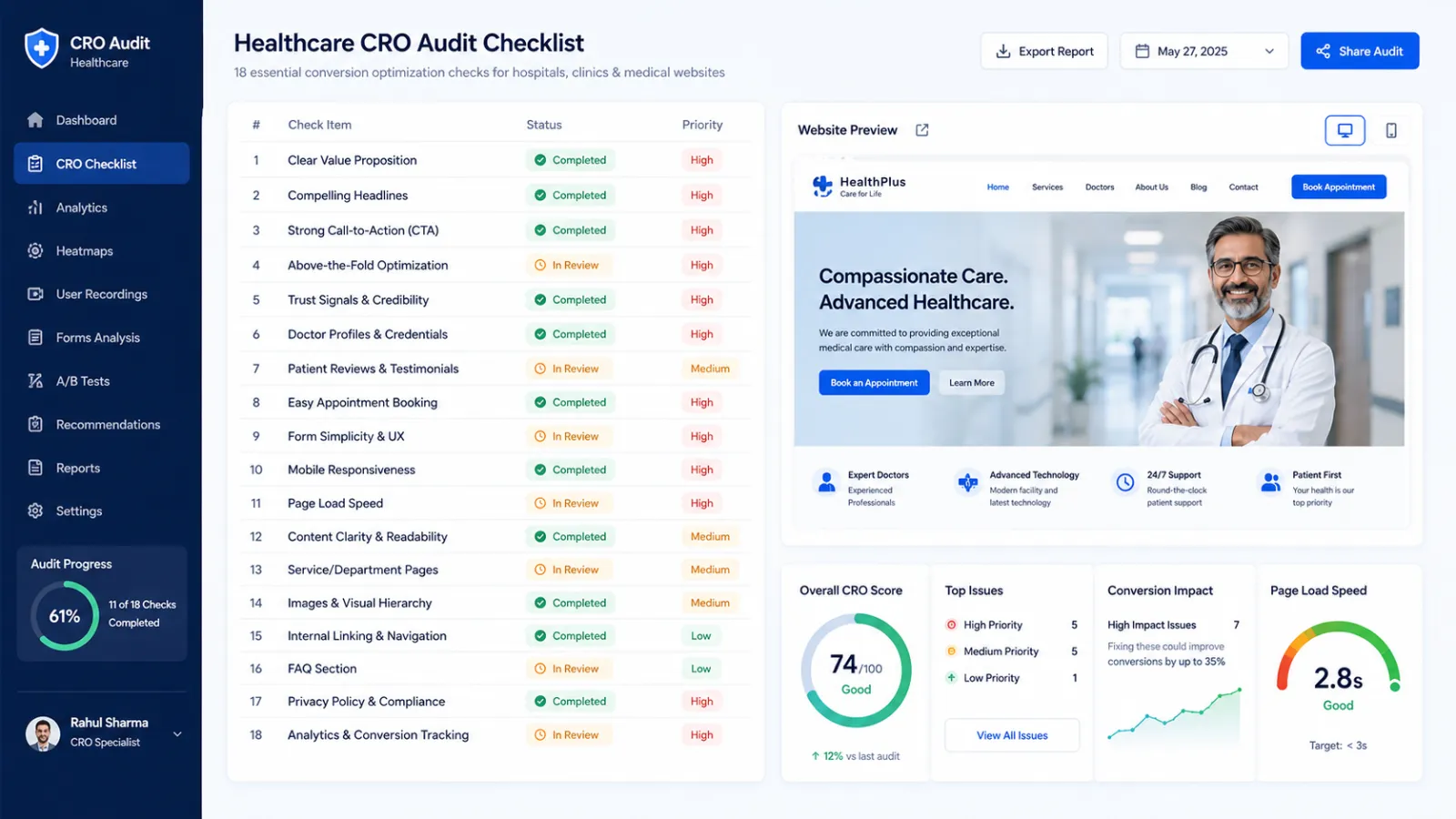
This checklist covers 18 specific items across six audit categories: trust signals, speed and Core Web Vitals, patient forms, compliance (DPDPA and NMC), booking friction, and analytics setup. Each item is actionable on its own, which means you can run the relevant sections in a focused two-hour session or work through all 18 as a complete cro audit checklist for clinics preparing for a paid campaign launch or site refresh.
Turn more of your existing traffic into customers
Twenty checks across landing pages, calls to action, forms, and trust signals. No extra traffic needed, just a better funnel.
What this checklist does not cover: The definition of CRO, the 4-stage optimisation process, and healthcare conversion rate benchmarks are covered in full on the healthcare CRO service page. This checklist focuses specifically on the audit mechanics, not the strategy fundamentals.
Why a Healthcare Website CRO Audit Is Different from a General Audit
Healthcare website conversion rate optimization operates under constraints that a general e-commerce or SaaS CRO audit does not encounter. Improving healthcare website conversion rate optimization is not simply about faster pages or prettier buttons; it requires compliance validation and patient-trust design that general CRO frameworks skip entirely. A healthcare-specific cro audit for healthcare websites must additionally verify:
- DPDPA 2023-compliant consent on all data-collection forms, not just a cookie banner
- NMC-compliant CTA copy with no guaranteed outcomes, comparative claims, or prohibited promotional language
- Medical credential and accreditation visibility that meets E-E-A-T standards for YMYL content
- Specialty-specific patient decision cycles: an IVF patient researching over six to eight weeks converts differently from a dental check-up patient booking same-day
- AI-referred traffic readiness: patients arriving from ChatGPT or Perplexity recommendations arrive with higher intent but zero familiarity with the specific brand, requiring faster trust establishment
The other critical distinction is between a UX audit and a CRO audit. A UX audit identifies design and navigation problems. A CRO audit identifies conversion blockers, which may or may not be design problems. A page can have clean, professional design and still fail the hospital website conversion audit because the appointment form requires twelve fields, loads slowly on 4G, or carries a CTA that violates NMC guidelines. Fix the conversion blocker, not the aesthetics.
The 18-Point Healthcare CRO Audit Checklist
Work through each item in order or jump to the category most relevant to your current audit scope. Each item is tagged with its category in brackets.
Category 1: Trust Signals (Items 1-4)
Trust signals are the first category to audit because they affect conversion on every other page of the site. A patient who does not trust the page within 10 seconds will not fill the form regardless of how well the rest of the checklist passes.
1. [Trust] Doctor credentials visible above the fold on mobile. Check: open the homepage and each specialty page on a mid-range Android device (not a laptop). Can you see the treating doctor’s name, degree (MBBS/MD/MS), and specialty without scrolling? If not, credential placement fails. The healthcare website design guide covers the specific above-fold layout structure that places credentials adjacent to the primary CTA.
2. [Trust] NABH/NABL accreditation badge positioned near the primary CTA. Check: does the accreditation badge appear within visual proximity of the appointment button or enquiry form on key landing pages? Accreditation placed only in the footer or About Us page does not serve as a conversion trust signal. It needs to be adjacent to the action point.
3. [Trust] Patient review count and recency visible on specialty pages. Check: are Google review snippets or embedded testimonials shown on specialty service pages, not just the homepage? Reviews on the homepage help first-time visitors; reviews on the cardiology page help cardiology searchers specifically. Review recency matters: a block of reviews dated 2022 on a 2026 page signals neglect.
4. [Trust] Last-reviewed date and named author on all clinical content pages. Check: does every blog post, condition page, and procedure page show the doctor or practitioner who authored or reviewed it, alongside a visible last-reviewed date? This is the foundational E-E-A-T requirement for YMYL healthcare content. Pages without this signal rank poorly and convert poorly for the same reason: patients do not trust unattributed medical information.
Category 2: Page Speed and Core Web Vitals (Items 5-7)
Speed is a conversion factor in healthcare because over 85% of Indian patients search on 4G mobile. A page that takes longer than 3 seconds to load loses a measurable share of its visitors before the form or CTA is even visible.
5. [Speed] LCP under 2.5 seconds on mobile (field data, not lab score). Check: open Google Search Console and navigate to Core Web Vitals report. Look at the field data for mobile LCP on your highest-traffic pages. A passing Lighthouse score in a lab test does not mean your real users on 4G are getting sub-2.5-second LCP. Field data is what Google uses for rankings. Core Web Vitals thresholds and fixes covers the specific interventions by failure type.
6. [Speed] INP under 200ms and CLS under 0.1 on appointment pages. Check: appointment booking pages and contact forms are where conversion happens. These pages must specifically pass INP (Interaction to Next Paint) and CLS (Cumulative Layout Shift) thresholds because layout shifts during form fill and slow response to tap interactions directly cause form abandonment. Google’s Core Web Vitals documentation and web.dev vitals guidance are the authoritative references.
7. [Speed] Images served in WebP format with explicit width and height attributes on all above-fold elements. Check: run the URL of your most important landing pages through PageSpeed Insights. Look for “Serve images in next-gen formats” and “Image elements do not have explicit width and height” warnings. Either failure on an above-fold element directly causes LCP and CLS problems. Fix the heaviest pages first.
Category 3: Patient Forms (Items 8-11)
Forms are the highest-friction conversion element on any healthcare website. The patient booking conversion checklist for forms is short: fewer fields convert higher, always.
8. [Forms] Appointment form field count at five or fewer on mobile. Check: count the required fields on your primary appointment booking form as it renders on mobile. Name, phone number, specialty, preferred date, and an optional message field is the maximum. Every additional required field measurably reduces form completion rate. If intake information beyond these five is genuinely required, collect it in a post-booking confirmation call, not in the booking form itself.
You already have the traffic. Are you converting enough of it?
Most websites convert a small fraction of the visitors they get. A free review shows you exactly what is stopping the rest from becoming customers.
No commitment, just a clear picture of where you stand.
9. [Forms] Click-to-call and WhatsApp link visible in the mobile sticky header. Check: on a mobile device, scroll 50% down your key landing pages. Is a phone number or WhatsApp button still visible without scrolling back to the top? Emergency-intent and immediate-intent patients will not scroll back up to find your number. Sticky header contact options serve the highest-intent visitors who have already decided to contact you and just need the mechanism.
10. [Forms] Form error messages are specific, not generic. Check: submit the appointment form with an empty field or an incorrectly formatted phone number. Does the error message say “Please fill in all required fields” or does it say “Please enter a valid 10-digit mobile number”? Specific error messages reduce frustration and form re-abandonment. Generic error messages make patients guess what they did wrong.
11. [Forms] Form submit confirmation is immediate and specific. Check: complete and submit the form. Does the patient receive immediate, specific confirmation? “Your appointment request has been received. We will call you within 2 hours to confirm.” converts better than a generic “Form submitted successfully” message because it sets expectations and reduces anxiety about whether the booking is actually being processed.
Category 4: DPDPA and NMC Compliance (Items 12-14)
This category is the genuine white-space opportunity in healthcare CRO audit content. No competing guide in the top 5 SERP results covers India-specific compliance requirements. DPDPA 2023 compliance is not optional for any website collecting patient data in India, and NMC Code of Medical Ethics governs what CTAs, claims, and testimonials are legally permissible on Indian medical websites.
12. [Compliance] Explicit consent checkbox on every data-collection form, with no pre-ticked state. Check: every form that collects a patient name, phone number, or email requires a visible, unchecked consent checkbox under DPDPA 2023. A pre-ticked or implied consent checkbox is non-compliant. The checkbox label must state what the data will be used for (appointment scheduling, health updates) in plain language. A cookie consent banner alone does not satisfy form-level data collection consent requirements.
13. [Compliance] CTA copy contains no guaranteed outcomes, no comparative claims, and no prohibited promotional language. Check: review every CTA button, headline, and form label on key service pages against three tests. First, does any copy guarantee a specific medical outcome (“guaranteed recovery,” “cure your condition”)? Second, does any copy make comparative claims (“best cardiologist in Mumbai,” “rated above all competitors”)? Third, does any copy use terms the NMC prohibits in medical advertising? Any failure on these three tests creates both legal compliance risk and, practically, a trust issue with patients who recognise overclaiming.
14. [Compliance] Privacy policy linked from every form and accessible within one click from the homepage. Check: does a Privacy Policy page exist, and is it linked directly from each form’s consent checkbox? The DPDPA 2023 requires that data subjects can easily access information about what data is collected, how long it is retained, and how they can request deletion. A privacy policy accessible only through a footer link three clicks from the form does not adequately meet the accessibility requirement for informed consent.
Category 5: Booking Friction and Landing Page Checks (Items 15-17)
Booking friction covers every friction point between a patient’s decision to contact your practice and the moment that contact is confirmed. This category matters most in the context of a healthcare landing page conversion checklist used before launching a paid campaign: any friction on the landing page you are sending paid traffic to will multiply the cost of every conversion.
15. [Booking] Specialty-specific landing pages for each paid campaign, not the homepage. Check: where does your Google Ads or Meta Ads campaign send traffic? If a cardiologist ad sends patients to the hospital homepage rather than a dedicated cardiology landing page, the patient must navigate to find the relevant information, creating friction at the most expensive point in the funnel. Healthcare PPC India campaign structure covers the full landing page architecture for healthcare paid campaigns.
16. [Booking] CTA messaging matches the patient’s decision stage. Check: is the primary CTA on the page a direct appointment booking request, a free consultation offer, or a general enquiry? For high-consideration specialties (IVF, oncology, complex surgery), patients at the research stage will not convert on “Book Appointment Now” because they are not yet ready to commit. A “Get a Free Consultation” or “Ask Our Specialist” CTA matches their actual stage. For low-consideration specialties (GP consultation, dental check-up, eye test), direct appointment booking CTAs outperform softer offers because the patient is already decided.
17. [Booking] Heatmap data reviewed for drop-off above the fold on key pages. Check: for pages with over 500 monthly visitors, is heatmap or session recording data available? Statistical confidence for behavioural data requires a minimum sample size; below 500 sessions the patterns are not reliable enough to drive layout decisions. For high-traffic pages, heatmap data identifies whether patients are seeing the CTA, whether they are clicking elements that are not links, and whether they are scrolling past the form. Skymoon’s heatmap analysis guide covers the specific heatmap types and what each pattern means for conversion.
Category 6: Analytics and Tracking Setup (Item 18)
18. [Analytics] Conversion tracking fires on actual conversions, not just page loads. Check: open GA4 and navigate to Reports > Realtime. Submit a test form on the site. Does a conversion event fire? Is it tagged to the specific form (appointment form, callback request) rather than just a generic “page_view” or “session_start” event? Broken or misconfigured conversion tracking is the single most common finding in healthcare CRO audits because it means the practice has no reliable data on which pages and campaigns are actually generating enquiries. Without accurate conversion data, every other CRO decision is based on assumption.
Healthcare CRO Audit Checklist – Quick Reference by Category
Use this table as a quick-reference overview of all 18 checks before running the full audit.
| # | Category | Audit Check | Pass Condition |
|---|---|---|---|
| 1 | Trust | Doctor credentials above fold on mobile | Name, degree, speciality visible without scrolling |
| 2 | Trust | Accreditation badge near primary CTA | NABH/NABL within visual proximity of booking button |
| 3 | Trust | Patient reviews on specialty pages | Recent reviews (last 6 months) on relevant service pages |
| 4 | Trust | Named author and review date on clinical content | Practitioner name, credentials, and last-reviewed date visible |
| 5 | Speed | Mobile LCP under 2.5s (field data) | Google Search Console: Core Web Vitals report passes |
| 6 | Speed | INP under 200ms, CLS under 0.1 on booking pages | Both pass on appointment and contact pages in field data |
| 7 | Speed | WebP images with explicit dimensions on above-fold elements | PageSpeed Insights: no next-gen format or dimension warnings |
| 8 | Forms | Appointment form: 5 fields or fewer on mobile | Name, phone, specialty, date, optional message only |
| 9 | Forms | Click-to-call/WhatsApp in mobile sticky header | Contact tap target visible throughout scroll depth |
| 10 | Forms | Specific error messages on form validation | Field-level error identifies exact issue, not “fill all fields” |
| 11 | Forms | Immediate and specific form submit confirmation | Message includes next-step timeline (e.g., “We call within 2 hours”) |
| 12 | Compliance | Unchecked DPDPA consent checkbox on every form | No pre-ticked boxes; label states data purpose plainly |
| 13 | Compliance | CTA copy: no guaranteed outcomes or comparative claims | Zero NMC-prohibited language on any service page CTA |
| 14 | Compliance | Privacy policy linked from every form | Accessible within one click of each form’s consent checkbox |
| 15 | Booking | Specialty-specific landing pages for paid campaigns | Each ad campaign links to matched specialty page, not homepage |
| 16 | Booking | CTA stage matches patient decision stage | High-consideration = consultation CTA; low-consideration = book now |
| 17 | Booking | Heatmap data reviewed for above-fold drop-off (500+ sessions) | Heatmap installed; key page patterns reviewed in last 90 days |
| 18 | Analytics | Conversion tracking fires on actual form submissions | GA4 Realtime shows conversion event on test form submission |
When Should You Run a Hospital or Clinic Website Conversion Audit?
Generic CRO guides recommend a fixed re-audit cadence (quarterly or every six months). For a hospital website conversion audit, a trigger-based approach is more practical than a fixed calendar because healthcare websites often go months without meaningful traffic changes and then shift dramatically after a campaign launch, a redesign, or a specialty addition.
Run this checklist when any of the following occurs:
- Before launching any paid advertising campaign. A traffic influx from Google Ads or Meta Ads to an unaudited landing page is expensive. The healthcare landing page conversion checklist (items 15-17) is the minimum pre-campaign check.
- After a website redesign or theme update. Redesigns routinely break form tracking, remove consent checkboxes, and shift CTA placement below the fold on mobile.
- When enquiry volume drops without a corresponding drop in organic traffic. This pattern indicates a conversion problem rather than a visibility problem.
- Before and after adding a new specialty or department page. New pages inherit the site’s structural defaults, which may not match the specific conversion requirements of that specialty.
- After any change to the appointment booking system or form plugin. Backend and plugin updates frequently reset form field configurations and break conversion tracking events.
CRO Audit vs UX Audit – What Is the Difference for Healthcare Websites?
A UX audit evaluates how easy the website is to navigate and use. A healthcare CRO audit evaluates whether the website converts visitors into patient enquiries. The two are related but not the same: a website can have clean, professional UX and still fail the cro audit checklist for clinics because its CTAs are NMC non-compliant, its forms have eight required fields, or its conversion tracking is broken. Conversely, a website with suboptimal UX can still convert reasonably well if the core conversion path (CTA to form to confirmation) is friction-free.
The practical sequencing for most clinics: run the CRO audit (this checklist) first to identify conversion blockers, then commission a UX audit to address the broader navigation and design experience. Running them in the reverse order often results in a redesign that looks better but does not specifically fix the conversion problems. For the UX optimisation layer that sits above this checklist, Skymoon’s UX for conversions guide covers the design decisions that directly affect patient behaviour after the conversion blockers identified here are resolved.
Ready to turn this into an actual growth plan?
Our team builds strategies across SEO, paid advertising, AI search visibility, and website performance, matched to your budget and your goals, not a generic package.
- A real thirty minute call, not a sales pitch
- Recommendations specific to your business
- A short list of what to fix first
Frequently Asked Questions – Healthcare CRO Audit
What is a good conversion rate for a healthcare website?
Global benchmarks for healthcare websites cluster between 2 and 4.2 percent depending on traffic source and specialty. Indian healthcare sites typically run 1.5 to 3.5 percent. Conversion rate alone is rarely the useful metric: an IVF clinic converting at 1.8 percent from high-intent organic traffic may be performing well, while a dental clinic converting at 3 percent from unqualified paid traffic may not. The full breakdown of healthcare conversion benchmarks by specialty and traffic source is covered on the healthcare CRO service page.
How often should you audit a hospital or clinic website for conversions?
Rather than a fixed calendar cadence, run a healthcare CRO audit against event-based triggers: before launching any paid campaign, after a redesign or plugin update, when enquiry volume drops without a traffic drop, before adding a new speciality page, and after any change to the booking system. For most active clinics, this means conducting two to four full audits per year, with no fixed schedule.
What is included in a CRO audit checklist for healthcare websites?
A complete healthcare CRO audit checklist covers six categories: trust signals (doctor credentials, accreditation badges, patient reviews), page speed (Core Web Vitals on mobile field data), patient forms (field count, error messages, submit confirmation), India compliance (DPDPA consent, NMC-compliant CTA copy, privacy policy accessibility), booking friction (landing page relevance, CTA stage matching), and analytics validation (conversion tracking fires on actual form submissions).
How is a healthcare CRO audit different from a general website CRO audit?
A general CRO audit checks speed, forms, trust signals, and analytics. A healthcare CRO audit must additionally verify DPDPA 2023-compliant consent on every form, NMC-compliant CTA language with no guaranteed outcomes or comparative claims, medical credential and NABH accreditation placement that meets YMYL E-E-A-T standards, and specialty-specific patient decision cycles that change what CTA type converts for each service page.
Do I need heatmaps and session recordings to run a CRO audit?
Not for a first pass. Below roughly 500 to 1,000 monthly sessions on a given page, behavioral heatmap data lacks statistical validity and may mislead. At that traffic level, focus the audit on structural fixes: form field count, CTA compliance, trust signal placement, and conversion tracking setup. Once pages pass 500 monthly sessions consistently, add heatmap review to the audit cycle for that page specifically.
Run Your Healthcare CRO Audit Today
Whether you run this patient booking conversion checklist as a standalone self-audit or as part of a broader digital marketing review, the output is the same: a prioritised list of specific fixes with clear pass conditions.
The 18 checks in this healthcare CRO audit checklist can be run independently or as a complete audit session. Most clinics find two to five high-impact items in the trust, forms, and compliance categories within the first pass. If you want an expert review of your clinic or hospital website against this checklist, request a free healthcare website audit and the Skymoon team will deliver a structured audit report within 48 hours covering your site’s current conversion blockers, compliance gaps, and priority fix sequence.
Let's turn this into results for your business.
SEO, paid advertising, AI search visibility, website design, and conversion optimization, all under one roof, all pointed at the same goal: revenue.