
Smart Goals Google Ads is one of the most underused features available to PPC advertisers who have not yet set up formal conversion tracking. If you want to understand how Google Ads work before diving into Smart Goals, that guide covers the full picture. Smart Goals use Google’s machine learning to identify your highest-quality website sessions and treat them as conversions. This guide covers everything from Smart Goals requirements to step-by-step setup, so your campaigns have an optimization signal from day one.
What Are Smart Goals in Google Ads?
Smart Goals are a machine learning-powered goal type in Google Analytics that identifies your best website sessions and imports them into Google Ads as a conversion signal.
Find out where your ad budget is leaking
A twenty four point walkthrough of your Google Ads and Meta Ads accounts, built to surface wasted spend and campaigns worth scaling.
When you cannot track specific actions like purchases or form submissions, Smart Goals act as a proxy conversion. Google’s algorithm analyzes dozens of behavioral signals to determine which visitors are most likely to convert. The top five percent of sessions from Google Ads traffic are marked as Smart Goals.
Signals used to score each session include:
- Session duration
- Pages viewed per session
- Device type and browser
- Geographic location
- Time of day and day of the week
Once enabled, Smart Goals apply to all website traffic, not just sessions originating from Google Ads.
Smart Goals Requirements
Before you can enable Smart Goals Google Analytics, your account must meet all of the following conditions:
- Your Google Analytics property must be linked to a Google Ads account
- The linked Google Ads account must generate at least 500 Analytics sessions in the past 30 days
- The Analytics view must receive fewer than 10 million sessions in a 30-day period
- You can create only one Smart Goal per Analytics view
- Smart Goals are a Universal Analytics feature and are marked as legacy in current Google documentation
If your account does not yet meet the 500-session threshold, continue running your campaigns. Once enough traffic has accumulated, the Smart Goal option will become available in your Analytics view.
How to Set Up Smart Goals in Google Analytics
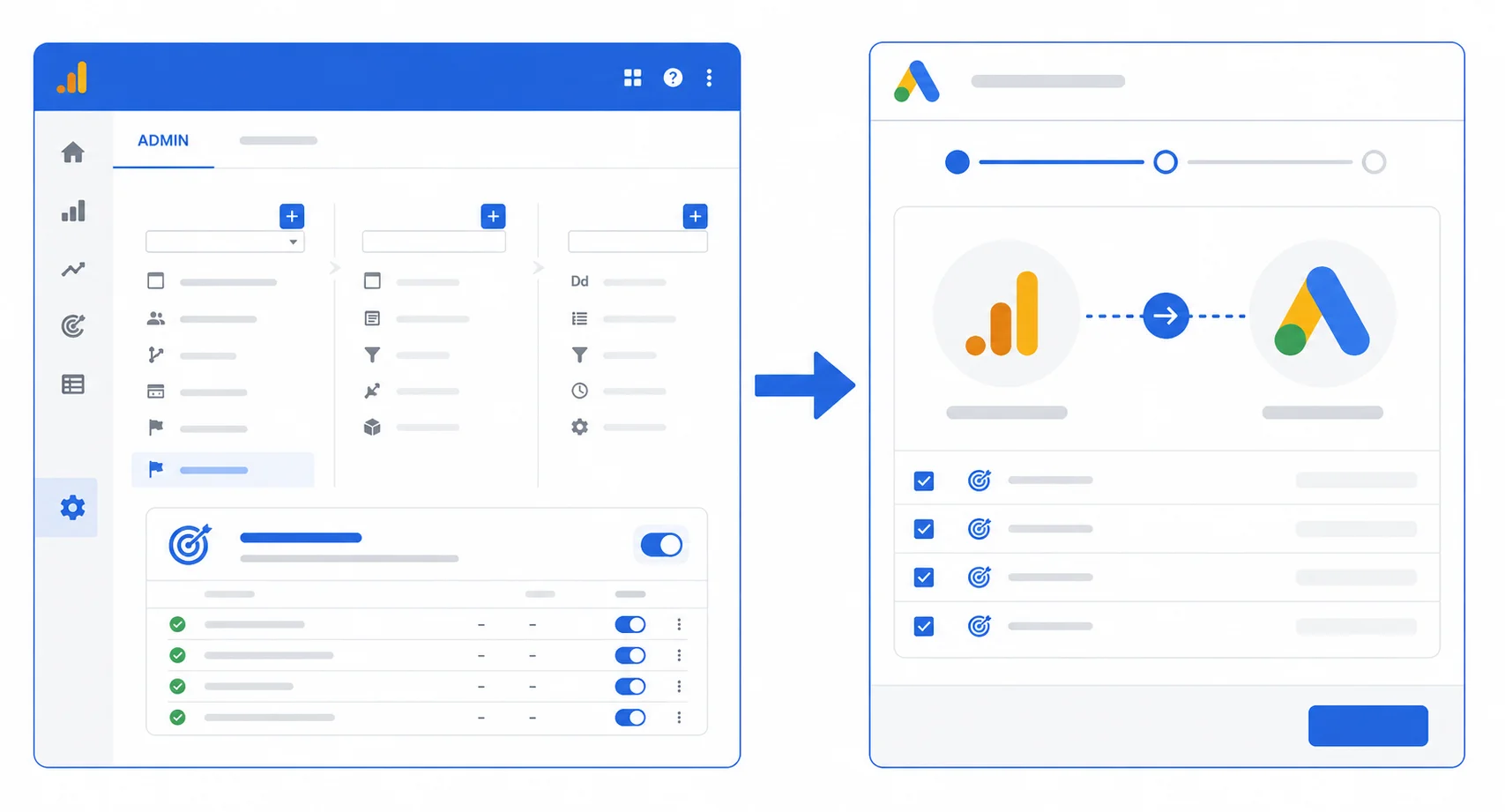
Setting up Smart Goals involves two stages. First you enable them inside Google Analytics. Then you import Smart Goals to Google Ads as a conversion action.
Step 1: Link Google Analytics to Google Ads
- Sign in to your Google Analytics account
- Click Admin in the bottom-left navigation panel
- In the Property column, click Google Ads Linking
- Select the Google Ads account you want to link
- Follow the on-screen prompts and save the link
If your accounts are already linked, skip directly to Step 2.
Step 2: Enable Smart Goals in Google Analytics
- In Google Analytics, click Admin
- In the View column, click Goals
- Click the red + New Goal button
- Select Smart Goal from the list of goal types
- Give your Smart Goal a name, for example “Smart Goal 1”
- Click Save
No additional configuration is needed. Smart Goals do not require you to specify a destination URL or monetary value.
Step 3: Import Smart Goals to Google Ads
- Sign in to your Google Ads account
- Click the Tools icon in the top navigation bar
- Under Measurement, click Conversions
- Click the + button to add a new conversion action
- Select Import
- Choose Google Analytics (Universal Analytics)
- Select your Smart Goal from the list and click Import and Continue
Your Smart Goal will now appear as a conversion action in Google Ads. You can pair it immediately with automated bid strategies such as Target CPA or Maximize Conversions. For the full official walkthrough, refer to Google’s conversion import documentation.
Smart Goals GA4: What You Need to Know
Smart Goals are a Universal Analytics feature and are labeled as legacy in current Google documentation. They are not natively available in Google Analytics 4.
If you are running GA4, the equivalent approach is to mark relevant GA4 events as key events and import them into Google Ads as conversions. GA4 allows up to 30 conversion events per property. This gives you far more precision and flexibility than Smart Goals ever could.
For advertisers still operating a linked Universal Analytics view, Smart Goals remain accessible. However, with Universal Analytics fully sunset in July 2024, most advertisers are now working entirely within GA4 and should focus on GA4 key events as their primary conversion signals.
How to Set Up Conversions in GA4 as a Smart Goals Alternative
If your account is fully on GA4, follow these steps to create conversion events that serve the same purpose as Smart Goals:
Are your ad campaigns paying for themselves?
A large share of Google and Meta ad budgets goes to campaigns that quietly underperform. Our free review shows you what to cut and what to scale.
No commitment, just a clear picture of where you stand.
- Sign in to Google Analytics 4 and click Admin
- Under the Property column, click Events
- Find the event you want to treat as a conversion, such as form_submit or page_view on a thank-you page
- Toggle the Mark as key event switch to on
- In Google Ads, go to Tools, then Conversions, then click Import
- Select Google Analytics 4 properties, choose your key event, and click Import and Continue
Once imported, your GA4 key events give Google Ads a precise and action-specific optimization signal. Unlike Smart Goals which rely on behavioral proxies, GA4 conversions are tied to real user actions. This makes them far more reliable for long-term campaign performance and accurate Smart Bidding decisions.
Troubleshooting: Why Smart Goals May Not Show Up
Several conditions can prevent Smart Goals from appearing in your Google Analytics view. Understanding these common blockers saves you time and frustration during setup.
- Fewer than 500 Google Ads sessions in the past 30 days: Wait until your campaigns have driven enough traffic. You cannot bypass this threshold.
- Google Analytics and Google Ads are not properly linked: Go to Admin, then Google Ads Linking, and verify the connection is active and confirmed on both platforms.
- The Analytics view receives more than 10 million sessions per month: Create a filtered view with a smaller traffic subset and attempt Smart Goal setup there.
- A Smart Goal already exists in this view: Only one Smart Goal is allowed per view. If you need to replace it, delete the existing one first and create a new one.
- You are working inside a GA4 property: Smart Goals are a Universal Analytics feature only. GA4 properties do not have a Smart Goals option. Use key events instead, as described in the section above.
If all conditions are met and Smart Goals still do not appear as a goal type, wait 24 to 48 hours and check again. The system can take time to validate your account eligibility after a recent Google Ads link or traffic spike.
Smart Goals vs Conversions
Understanding the difference between Smart Goals and standard conversion tracking helps you choose the right approach for your account.
| Feature | Smart Goals | Conversion Tracking |
|---|---|---|
| Setup complexity | Low, no coding required | Moderate, requires tag setup |
| Data accuracy | Proxy signal, approximate | Exact, action-specific |
| Customization | None | Fully customizable |
| Best for | Accounts without tracking | All established accounts |
| Bidding compatibility | Target CPA, Maximize Conversions | All Smart Bidding strategies |
Smart Goals are a starting point, not a long-term solution. As soon as your team can implement tracking tags, switching to dedicated conversion actions will give your bidding algorithm a much stronger signal. You can learn more in the official Google Ads conversion goals documentation.
Smart Goals vs Smart Bidding
These two features are frequently confused because of their similar names. They serve completely different purposes.
Smart Goals are a conversion measurement tool. They define what counts as a conversion in your Google Ads account when you do not have explicit tracking in place.
Smart Bidding is a set of automated bid strategies that use Google AI to optimize bids at auction time. Smart Bidding strategies include Target CPA, Target ROAS, Maximize Conversions, and Maximize Conversion Value.
The relationship between them is straightforward. Smart Goals provide the conversion signal. Smart Bidding uses that signal to adjust your bids in real time for every auction. Without a conversion signal of some kind, Smart Bidding cannot optimize effectively. This is exactly why Smart Goals exist as a bridge for accounts that have not yet implemented formal conversion tracking.
A practical example makes this relationship clear. A local service business runs Google Ads campaigns but has not installed any conversion tags on its website. They enable Smart Goals in Google Analytics and import them into Google Ads. Google identifies that visitors who spend more than three minutes on the site and view at least four pages are the highest-quality sessions. These sessions become the Smart Goal conversion signal. The advertiser then activates Target CPA bidding and sets a target cost per Smart Goal. Google Ads now bids higher for users who match the behavioral profile of past high-quality visitors. The campaign starts optimizing toward genuine engagement rather than distributing budget across random clicks with no direction.
Smart Goals Benefits
Smart Goals benefits are most significant for small businesses and new advertisers running Google Ads without any conversion tracking in place. Key advantages include:
- No coding or tag implementation required
- Machine learning automatically identifies high-quality sessions
- Compatible with Google Ads Smart Bidding strategies out of the box
- Takes only minutes to configure inside Google Analytics
- Provides an immediate optimization signal for campaigns with no prior conversion data
Even an approximate conversion signal is better than none at all. Smart Goals allow your bidding algorithm to start learning faster while you work toward proper tracking. To make the most of your ad budget, also review common PPC mistakes that can undermine campaign performance even when tracking is in place.
Are Smart Goals Google Ads Worth It?
Smart Goals Google Ads worth it largely depends on where your account currently stands.
If you have zero conversion tracking and are spending money on Google Ads with no optimization signal, Smart Goals are absolutely worth setting up. They are free, fast to implement, and give your campaigns a direction to optimize toward immediately.
If you already have conversion tracking in place through Google Ads tags or GA4 key events, Smart Goals add little additional value. In that case, focus on improving your existing conversion actions and bid strategies rather than adding a proxy signal.
Consider two advertisers running identical budgets on the same keywords. Advertiser A has no tracking at all. Google Ads distributes budget evenly with no optimization signal. After 30 days, cost per click remains high and session quality is inconsistent because the algorithm has no data to learn from. Advertiser B enables Smart Goals and runs the same budget with Target CPA bidding. Within two to three weeks, the algorithm identifies patterns among high-quality sessions and begins steering budget toward those user profiles. Cost per meaningful visit drops and the proportion of engaged sessions increases. The campaigns are not identical anymore, despite starting with the same budget and keywords. The only difference is the optimization signal.
Think of Smart Goals as a temporary foundation. They are strong enough to build on, but your long-term goal should always be precise conversion tracking matched to your actual business objectives. Once your campaigns are generating data, calculate your PPC ROI to understand exactly what return your ad spend is delivering.
Frequently Asked Questions (FAQs)
Can I use Smart Goals with GA4?
Smart Goals are a Universal Analytics legacy feature and are not available natively in GA4. In GA4, mark important events as key events and import them into Google Ads as conversions. This approach gives you more precision and control than Smart Goals and is the recommended path for all advertisers who have migrated to GA4.
How many Smart Goals can I create per Analytics view?
You can create only one Smart Goal per Google Analytics view. This limit is set by Google and cannot be changed. If you need to track multiple conversion types, implement standard conversion tracking using Google Ads tags or GA4 key events, which allow up to 30 conversion events per property.
Do Smart Goals work with all bid strategies?
Smart Goals work best with automated bid strategies such as Target CPA and Maximize Conversions. They are not well suited to manual CPC bidding because the value of Smart Goals comes entirely from feeding data into Google’s automated optimization systems, which manual bidding does not use.
What is the minimum traffic requirement for Smart Goals?
Your Google Ads account must generate at least 500 Analytics sessions from Google Ads traffic in the past 30 days before Smart Goals become available. Your Analytics view must also receive fewer than 10 million sessions in that same 30-day period. Both conditions must be met simultaneously.
Ready to turn this into an actual growth plan?
Our team builds strategies across SEO, paid advertising, AI search visibility, and website performance, matched to your budget and your goals, not a generic package.
- A real thirty minute call, not a sales pitch
- Recommendations specific to your business
- A short list of what to fix first
Conclusion
Smart Goals Google Ads provide a practical starting point for advertisers who are not yet able to track specific conversions on their website. By linking Google Analytics to Google Ads, meeting the minimum Smart Goals requirements, and importing the goal as a conversion action, you give your campaigns a meaningful optimization signal within minutes and at no additional cost.
While Smart Goals are a legacy feature and are not natively available in GA4, they remain a useful bridge for Universal Analytics users making the transition to proper conversion tracking. Use them as a foundation, not a permanent solution. The sooner you move to dedicated conversion tracking through GA4 key events, the more accurate and powerful your campaign optimization will become.
Let's turn this into results for your business.
SEO, paid advertising, AI search visibility, website design, and conversion optimization, all under one roof, all pointed at the same goal: revenue.