
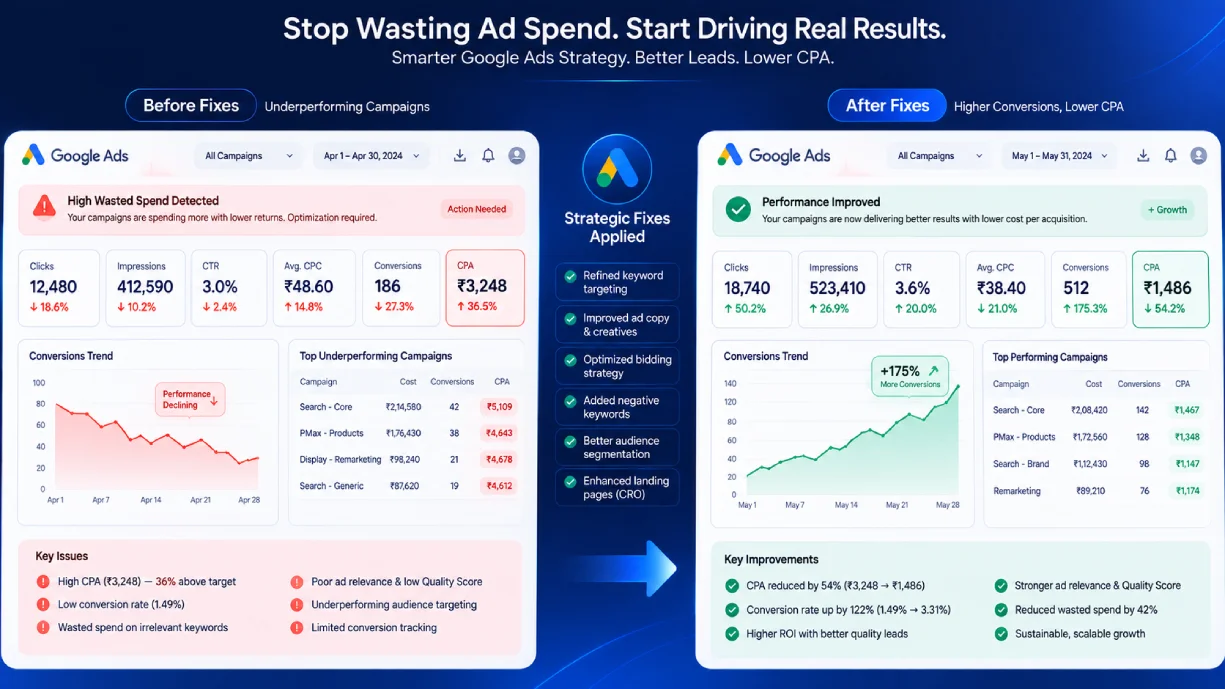
PPC mistakes are expensive in a way that is hard to detect from inside the account. The budget keeps spending, the campaigns keep running, and nothing in the dashboard flags that 40-60% of the ad spend is going to keywords that will never convert, audiences that are too broad, or automation that has been given too little data to make good decisions. WordStream’s 2026 analysis estimated that the average Google Ads account wastes 61% of its budget on avoidable errors.
These are the 12 most common ppc mistakes in 2026, drawn from GSC-confirmed query demand and the AI bidding pitfalls that have emerged as a new category of error since Smart Bidding and Performance Max became the default. Each mistake follows the same structure: what the mistake is, why it happens, and exactly how to fix it with specific numbered steps rather than general advice. If you already know which mistake is hurting your campaigns and want only the diagnostic steps, jump to the “how to fix ppc mistakes” section for each specific error.
Find out where your ad budget is leaking
A twenty four point walkthrough of your Google Ads and Meta Ads accounts, built to surface wasted spend and campaigns worth scaling.
The most important common ppc mistakes to avoid are also the most invisible: they generate activity in the account without generating results. Spend continues, impressions accumulate, and the campaigns appear to be working until the revenue numbers are checked against what was spent.
Who this guide is for: In-house PPC managers, agency teams, and business owners running their own Google Ads campaigns who want to diagnose why campaigns are underperforming and fix specific structural problems. If you are new to Google Ads entirely, start with the how Google Ads work guide first.
Mistake 1: Running Campaigns Without Verified Conversion Tracking
The common ppc mistakes google ads 2026 accounts make most often start in the same place: structural decisions made at campaign launch that were never revisited. Running paid traffic without verified conversion tracking is the foundational common ppc mistake. The account still spends, still generates impressions, and still shows clicks. But the optimization signal Google’s algorithm uses to decide which auctions to enter and which bids to raise is either absent or wrong. Smart Bidding optimizes toward whatever conversion action is defined. If that action is broken, unmeasured, or measuring the wrong event, the algorithm optimizes confidently in the wrong direction.
Why it happens: most accounts set up tracking once at launch and never revalidate it. Plugin updates, site migrations, theme changes, and checkout flow modifications break conversion tags silently. The campaign continues running on the momentum of its historical data while the actual signal decays.
How to Fix It
- Open Google Tag Assistant Legacy or the Tag Assistant Chrome extension. Navigate to your conversion confirmation page (thank-you page, booking confirmation, or phone call trigger). Confirm the conversion tag fires. If it does not fire, the tag is broken.
- In Google Ads, go to Tools > Conversions. Check the Status column for each conversion action. “No recent conversions” or “Inactive” means the tag has stopped firing. “Unverified” means it has never confirmed a successful fire.
- If you use Google Analytics 4 imported conversions, verify that the GA4 event is marked as a key event in GA4 property settings AND that the GA4 property is linked to Google Ads. The Smart Goals and conversion tracking guide covers the GA4 to Google Ads linkage in detail.
- After fixing the tag, wait 48 hours and then confirm a test conversion fires in the Diagnostics tab of the specific conversion action. Do not re-enable Smart Bidding until you have at least 7 consecutive days of valid conversion data.
Mistake 2: Using Broad Match Without a Negative Keyword List
Broad match in 2026 expands further than most advertisers expect. Google’s broad match algorithm will enter auctions for queries that are semantically related to the keyword but may be commercially irrelevant to the business. A plumber running broad match on “pipe fitting” will appear for “pipe smoking accessories” or “copper pipe prices” if Google’s model judges the underlying search intent to be close enough.
Why it happens: broad match is the default match type in new campaigns, and its expanded reach produces high impression volume that looks encouraging in reports. The conversion rate on that traffic tells a different story, but only if conversion tracking is set up correctly (see Mistake 1).
How to Fix It
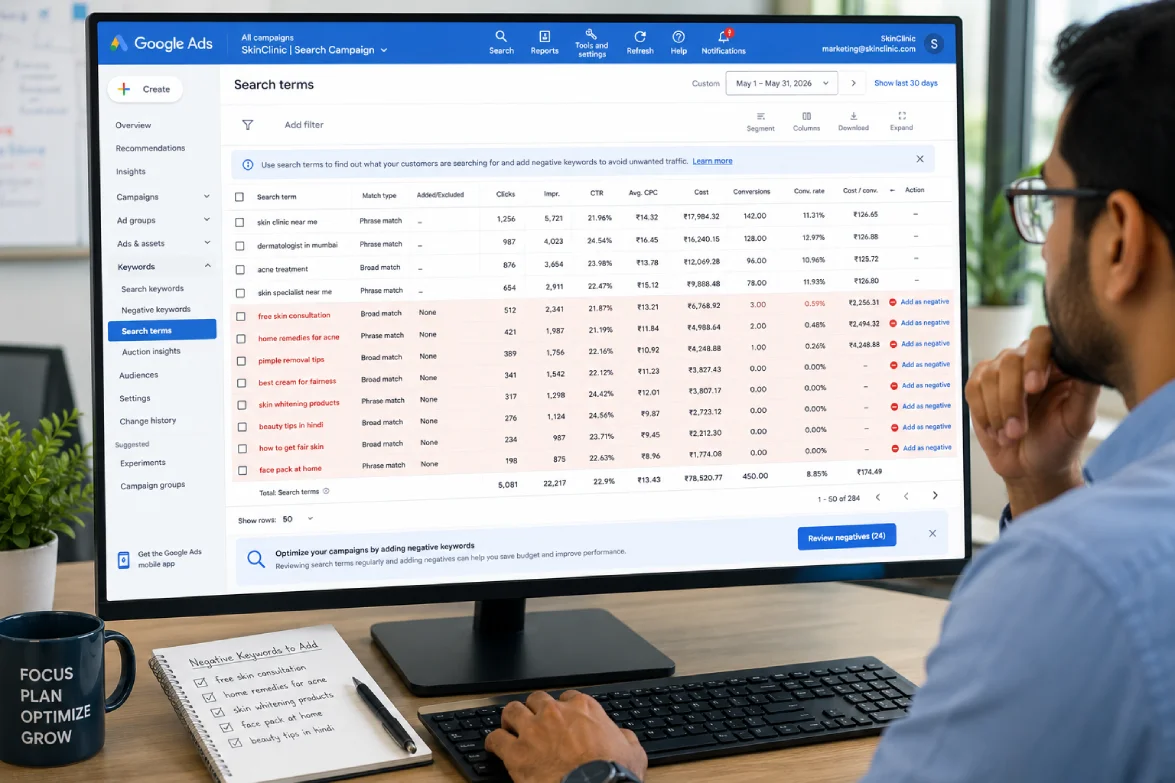
- Go to Keywords > Search Terms in Google Ads. Set the date range to the last 30 days. Filter for terms with more than 5 clicks and 0 conversions. These are candidates for negative keywords.
- Export the search terms report. Sort by cost descending. Review the top 20 terms by spend for relevance. Any term that would not be a viable customer query gets added as an exact or phrase negative.
- Build a shared negative keyword list under Shared Library > Negative Keyword Lists. Apply it to all campaigns using the same account. Individual campaign negatives take time and miss cross-campaign bleed.
- Schedule a weekly 20-minute search term review. Broad match requires ongoing negative management, not a one-time setup. Set a recurring calendar block on Monday morning to review the previous week’s search terms.
Mistake 3: Campaign and Ad Group Structure That Dilutes Quality Score
Quality Score is determined at the keyword level by three factors: expected click-through rate, ad relevance, and landing page experience. When an ad group contains 40 keywords across five different intent categories, the ads cannot be relevant to all of them. The keywords with lower match-to-ad relevance pull down Quality Score for the entire group, raising costs across the board.
Why it happens: campaign structure is set up once during onboarding, often by mirroring a website’s navigation or dumping all keywords into one ad group to launch quickly. As the account grows, the structure is rarely audited.
How to Fix It
- Open the Keywords report and add the Quality Score columns: Quality Score, Expected CTR, Ad Relevance, Landing Page Experience. Sort by impressions descending. Any keyword with Ad Relevance = “Below Average” is misplaced in its current ad group.
- Regroup keywords so each ad group contains a single tightly themed cluster. The test: can you write one headline that is directly relevant to every keyword in this ad group? If not, the group needs splitting.
- Create responsive search ads with headlines that contain the exact match keyword or its close synonym. Google’s RSA testing favors high-relevance ad copy. Include the primary keyword in at least 3 of the 15 headlines.
- After restructuring, monitor Quality Score over 14 days. Improvements in Ad Relevance will show within one week of the restructure going live.
Mistake 4: Landing Page That Does Not Match the Ad’s Promise
Ad relevance and landing page experience are the two Quality Score components that most advertisers cannot fix with a bid adjustment. If a user clicks an ad promising “20% off winter coats” and lands on a homepage with no reference to the offer, the mismatch registers as a poor landing page experience. Quality Score drops, cost per click rises, and conversion rate falls simultaneously.
Why it happens: the same homepage or generic service page is used as the destination for every ad in the account because creating dedicated landing pages takes time and resources that campaign managers do not have.
How to Fix It
- Audit your top 10 ad groups by spend. For each, open the ad and then open its landing page. Verify: (a) the landing page headline mentions the keyword or offer from the ad, (b) the primary CTA is visible above the fold on mobile without scrolling, (c) there is no navigation that pulls the visitor off the conversion path.
- For campaigns driving significant spend, create dedicated landing pages per ad group or campaign theme. PPC landing page design best practices covers the specific page elements that affect Quality Score and conversion rate.
- Check page load speed on mobile using PageSpeed Insights. A landing page scoring below 50 on mobile performance is actively hurting Quality Score through the Landing Page Experience component.
- Align the landing page’s conversion goal with the campaign’s bidding objective. If the campaign bids for leads, the landing page should have a form. If the campaign bids for purchases, the landing page should reach checkout in two clicks maximum.
Mistake 5: Treating the Search Terms Report as Optional
The search terms report shows the actual queries that triggered the ads. It is the most actionable data source in a Google Ads account and the one most consistently ignored by accounts that rely on automated bidding to handle everything. Without regular review of the search terms report, negative keyword gaps accumulate, irrelevant traffic compounds, and the account’s conversion signal becomes noisier over time.
Why it happens: automated bidding creates a false confidence that the algorithm is handling targeting optimization. It is handling bid optimization. Keyword expansion and negative keyword management remain human responsibilities even when Smart Bidding is active.
How to Fix It
- Set a recurring weekly task: Keywords > Search Terms, date range last 7 days, filter for clicks > 0. Review every term. Flag anything that could not plausibly lead to a conversion from your business.
- Sort by cost descending. Identify the five highest-cost terms that produced zero conversions. These are the terms costing the most money for the least return. Add as negatives at campaign level immediately.
- Look for patterns, not just individual terms. If the account is regularly triggering on “free,” “jobs,” “salary,” “DIY,” or “PDF,” add these as broad negatives at account level through the shared negative keyword list.
- After 90 days of weekly reviews, schedule a quarterly deep-clean: pull all search terms for the quarter, run them through a sort by spend with zero conversions, and add everything above a $20 per-term threshold to the shared negative list.
Mistake 6: Allocating Budget by Campaign Preference, Not by Performance Data
Budget allocation in most accounts is set at launch and adjusted only when a campaign’s daily budget triggers a “Limited by budget” notification. This means the highest-spending campaigns are often the best-funded, regardless of whether they are the highest-converting. A campaign spending $500 per month at a 2% conversion rate is consuming budget that could go to a campaign spending $100 per month at an 8% conversion rate.
Are your ad campaigns paying for themselves?
A large share of Google and Meta ad budgets goes to campaigns that quietly underperform. Our free review shows you what to cut and what to scale.
No commitment, just a clear picture of where you stand.
Why it happens: budget changes feel risky. Reducing a campaign’s budget that has been running for six months feels like breaking something. Advertisers tend to add new budget rather than redistribute existing budget.
How to Fix It
- Pull a campaign-level report for the last 90 days sorted by cost per conversion, ascending. The campaigns with the lowest cost per conversion are the ones most deserving of additional budget. Campaigns with cost per conversion above the target should be reviewed before receiving additional funds.
- Calculate the incremental return of shifting budget from your highest-CPA campaign to your lowest-CPA campaign. PPC ROI calculation methodology covers the formula for comparing campaign-level return before reallocating.
- Reduce the worst-performing campaign’s daily budget by 20%. Monitor for 14 days. If conversion volume from that campaign drops but overall account performance improves, the reallocation is working.
- Use Portfolio Bid Strategies to let Google distribute budget across campaigns that share a conversion goal. This automates the ongoing reallocation within a defined set of campaigns without requiring manual intervention per campaign.
Mistake 7: Common Mistakes When Scaling PPC Campaigns
Common mistakes when scaling ppc campaigns follow a predictable pattern: something works at $1,000 per month, so the budget is doubled, and the results do not scale linearly. Conversion volume does not double. Cost per conversion rises. The campaign that was efficient at a lower budget becomes inefficient under pressure.
Scaling PPC campaigns requires understanding that Google’s auction system is not a fixed-price market. At higher spend levels, the account competes for more impressions, which means entering more auctions at lower historical win rates. The marginal cost of each additional impression is higher than the average cost of existing impressions.
How to Fix It
- Scale spend by 20-30% per two-week period, not by doubling. Smart Bidding strategies adjust bid models based on recent data. A sudden 100% budget increase gives the algorithm more budget to spend before it has learned where the efficient auctions are. Gradual scaling allows the model to adjust incrementally.
- Before scaling, confirm that conversion volume over the last 30 days is stable. If conversion rate has been declining over the most recent 14 days, scaling will amplify the problem, not fix it. Diagnose first, scale second.
- When scaling into new geographic areas or audience segments, treat each new segment as a separate test with a separate budget. Do not pool new geographic expansion with proven markets in the same campaign. The proven market’s conversion history will absorb the expansion budget and mask whether the new segment is performing.
- Review impression share lost to budget vs. impression share lost to rank. If most impression share is lost to rank, increasing budget will not improve results because the account is already losing auctions on relevance and bid, not on budget availability.
Mistake 8: Running Responsive Search Ads Without Reviewing Asset Performance
Responsive search ads with 15 headlines and 4 descriptions look like they are self-optimizing because Google rotates and tests the combinations automatically. The error is treating RSA setup as a set-and-forget exercise. Google tests all submitted assets and identifies which combinations perform best, but it does not remove poorly performing assets. Advertisers leave low-performance headlines in the rotation because they never check the asset report.
Why it happens: the RSA format makes ad management feel simpler than it was with expanded text ads. Once created, there is no obvious prompt to revisit asset performance. Campaigns with “Learning” or “Eligible” status appear healthy.
How to Fix It
- In Google Ads, navigate to the ad level of each RSA. Click into the ad and open the “Asset details” panel. Headlines and descriptions are rated as Best, Good, or Low. Identify any assets rated Low.
- Replace “Low” assets with variants that more specifically match the ad group’s keyword theme. If a headline is rating Low, it is either too generic, too similar to another existing headline, or not matching search intent well.
- Pin a headline containing the primary keyword or unique value proposition to Position 1. Pinning ensures that the most commercially relevant headline always appears in the dominant position regardless of which combination Google selects for a given auction.
- Run RSA performance reviews quarterly. Check click-through rate at the ad level compared to other ad groups. An RSA with CTR significantly below the account average is underperforming and needs fresh assets.
Mistake 9: Ignoring Device-Level Performance Differences
Most Google Ads accounts serve ads across desktop, mobile, and tablet simultaneously with the same bids. Device-level conversion rates in most industries differ substantially. B2B lead generation campaigns often see 2-4x higher conversion rates on desktop than mobile. E-commerce campaigns often see the inverse. Running identical bids across all devices means either overpaying for low-converting devices or leaving efficiency on the table for high-converting ones.
Why it happens: device bid adjustments are buried in the Settings tab of each campaign. They are not surfaced prominently in the main campaign view, so advertisers who do not specifically look for them often do not find them.
How to Fix It
- Pull a campaign-level report segmented by device (Segment > Device). Compare conversion rate and cost per conversion across Desktop, Mobile, and Tablet for each campaign over the last 90 days.
- For any device with cost per conversion more than 50% above the campaign average, apply a negative bid adjustment in Campaign Settings > Devices. A -30% adjustment on mobile reduces mobile bids proportionally without eliminating mobile traffic entirely.
- For any device with cost per conversion more than 30% below the campaign average, apply a positive adjustment to capture more of that efficient traffic. Maximum positive bid adjustment in most strategies is +300%.
- Tablet traffic is often negligible in volume but may have disproportionate cost. If tablet conversion rate is near zero across multiple campaigns, apply -100% tablet adjustment to exclude it entirely.
Mistake 10: AI Bidding Mistakes in Google Ads 2026
AI bidding mistakes google ads practitioners make in 2026 represent the newest category of common ppc mistakes and the one where the fixes are least obvious to practitioners who learned Google Ads before automated bidding became the default. Smart Bidding, Performance Max, and AI Max for Search are powerful when conditions are right. When conditions are wrong, they optimize confidently in the wrong direction without surfacing any warning.
Cannibalization note: This section covers what goes wrong with AI bidding and specific fixes. For the full explanation of how Smart Bidding and automation work, see the AI in PPC guide.
AI Bidding Mistake A: Enabling Smart Bidding Before the Data Floor Is Met
Smart bidding mistakes of this type are the most expensive in the account because the algorithm enforces its decisions with confidence. Smart Bidding requires a minimum of approximately 30 conversions per month in the last 30 days to leave the learning phase with reliable data. Below this threshold, the algorithm uses generalized account and industry signals rather than account-specific conversion patterns. New campaigns launched directly into Target CPA or Target ROAS with no conversion history are running Smart Bidding on insufficient signal.
How to Fix It
- For new campaigns or campaigns with fewer than 30 conversions per month, start with Maximize Clicks (not Smart Bidding) for 3-4 weeks. This builds click volume and conversion history before the algorithm needs to optimize bids around conversions.
- Once the campaign records 30+ conversions over 30 days, switch to Maximize Conversions (without a target). Run for another 3-4 weeks before adding a Target CPA. Adding the CPA target too early restricts the algorithm before it has enough data to bid accurately.
- Set a Target CPA that is 20-30% above your actual recent cost per conversion when first applying it. A Target CPA set too aggressively (below actual CPA) forces the algorithm to reduce spend and miss auctions it could win efficiently.
AI Bidding Mistake B: Breaking the Smart Bidding Learning Period
Smart Bidding enters a learning period any time a significant change is made to a campaign: bid strategy switch, substantial budget change, audience targeting modification, or major ad copy update. During the learning period, performance fluctuates as the model recalibrates. Advertisers who see performance dip during the learning period often make another change to fix it, which resets the learning period and keeps the campaign in perpetual relearning.
How to Fix It
- After any significant campaign change, leave the campaign running for a minimum of 14 days without further changes. The learning period label in the Status column will disappear once the model has enough new data.
- Do not make multiple changes simultaneously. One change at a time, with a 14-day observation window between changes, allows attribution of performance changes to specific modifications.
- If performance is severely degraded during learning, pause the campaign and restore the previous state rather than layering additional changes. Changing multiple variables simultaneously makes root cause identification impossible.
AI Bidding Mistake C: Running Performance Max Without Asset Group Separation
Performance Max campaigns without audience signal segmentation or asset group separation treat all products or services as equivalent optimization targets. A high-ticket service and a low-ticket product in the same Performance Max campaign will have their budgets distributed by Google’s algorithm based on whatever generates the most conversion volume, which is usually the lower-ticket item. Search Engine Land’s analysis of Performance Max mistakes identifies asset group separation as the most commonly missed implementation step.
How to Fix It
- Create separate asset groups for each distinct product category, service type, or margin tier. Each asset group should have its own audience signals, creative assets, and URL rules. Do not mix high-CPA and low-CPA conversion goals in the same asset group.
- Add first-party audience signals to each asset group: customer match lists, website visitors by page category, YouTube viewers by content type. Performance Max without audience signals relies entirely on Google’s broad signals and performs poorly in accounts without established conversion history.
- Review Performance Max’s search terms insight report weekly. Go to Insights > Search Terms. Identify irrelevant query themes. Add these as campaign-level negative keywords through the account’s negative keyword list. PMax does not have a standard search terms report, but the Insights tab provides category-level signal.
AI Bidding Mistake D: Accepting Auto-Applied Recommendations Without Review
Auto-applied recommendations in Google Ads include broad match upgrades, RSA suggestion applications, bidding strategy changes, and keyword additions. When auto-apply is enabled without review, Google automatically implements recommendations that may directly conflict with the account’s existing strategy. Broad match upgrades on phrase match keywords that were deliberately set to phrase match for targeting control are a common consequence.
How to Fix It
- Go to Recommendations > Auto-apply settings. Review which recommendation categories are enabled for auto-apply. Disable auto-apply for all categories that touch match types, bidding strategies, and keyword additions.
- Keep auto-apply enabled only for low-risk recommendations: ad rotation settings, upgraded URLs, and some ad extension additions. These categories have low potential for structural damage.
- Set a weekly Recommendations review. Accept or dismiss individual recommendations manually. Dismissing a recommendation removes it from the list and prevents it from reappearing for 30 days.
Mistake 11: Running Search Campaigns Without Audience Layer Data
Search campaigns target intent signals (queries) rather than people. Audience layering adds a behavioral and demographic dimension that allows bid adjustments based on who is searching, not just what they searched for. An account running search campaigns with no audience layers has no ability to bid more aggressively on previous website visitors, customer match segments, or high-intent demographic groups.
Why it happens: audience setup is a second step after campaign creation, and many campaigns are launched without returning to it. Observation-mode audiences (which do not restrict targeting but collect data) are often never created, so there is no audience data to act on when optimization time comes.
How to Fix It
- Add all relevant audiences to all campaigns in observation mode. Observation mode does not restrict ad delivery but collects performance data segmented by audience. Add: website visitors (all users), website visitors by page category, customer match (if email list is available), and in-market audiences relevant to the product category.
- After 30 days of observation data, review the audience segment report. Sort by conversion rate. Segments with conversion rates 50% or more above the campaign average are candidates for positive bid adjustments (+20-30%).
- Segments with conversion rates significantly below average that are adding cost without return are candidates for negative bid adjustments or exclusion. Previous customers, for example, may be irrelevant for new customer acquisition campaigns.
Mistake 12: No Systematic Diagnostic Process When Performance Drops
Common paid advertising mistakes compound over time because each undetected error produces a noisier data environment, which makes the next mistake harder to catch. When PPC campaign performance drops, the default response in most accounts is to change bids, pause keywords, or add budget. These are all guesses without a diagnostic framework. A systematic approach identifies the specific layer of the funnel where performance broke before making any changes.
Why it happens: there is no dashboard view that shows “the problem is here” with a single click. Diagnosing performance drops requires checking multiple reports in sequence, which most practitioners skip in favor of faster interventions.
How to Fix It
- Start at impression share. A drop in impressions means either budget or Quality Score declined. Check: (1) lost impression share due to budget vs. lost impression share due to rank. Budget losses are fixed with more budget or tighter targeting. Rank losses require Quality Score or bid improvements.
- If impressions are stable but clicks dropped, the click-through rate declined. Check the ad copy asset report for any Low-rated assets that may have started serving more frequently. Check whether a competitor entered the auction (auction insights report).
- If clicks are stable but conversions dropped, the conversion rate declined. Check: (1) conversion tag still firing (Tag Assistant), (2) landing page speed (PageSpeed Insights), (3) whether the audience receiving clicks changed (demographic and audience segment reports).
- Document the diagnostic result before making any change. “Impressions dropped 22% because impression share lost to budget increased from 8% to 31% after the budget was cut” is a specific root cause. Addressing it with a specific fix (restoring budget or tightening targeting to reduce impression share loss) is measurably more effective than making a bid change and watching for 14 days.
PPC Mistakes Quick Reference: All 12 Errors and Fixes
| Mistake | Root Cause | First Fix Step |
|---|---|---|
| 1. Broken conversion tracking | Tags not revalidated after site changes | Run Google Tag Assistant on conversion confirmation page |
| 2. Broad match without negatives | Default match type, no negative list | Review Search Terms report, add 30-day no-conversion terms as negatives |
| 3. Poor ad group structure | Launched with all keywords in one group | Check Ad Relevance column, split ad groups to one-theme clusters |
| 4. Landing page mismatch | Generic destination for all ads | Audit top-10 ad groups: ad promise vs. landing page headline |
| 5. Ignoring search terms report | Over-reliance on automation | Set weekly 20-min search term review with calendar block |
| 6. Budget not tied to performance | Set at launch, never redistributed | Sort campaigns by cost per conversion, shift budget to lowest CPA |
| 7. Scaling without prep | Doubling budget before diagnosing efficiency | Scale 20-30% per 2-week period, check conversion rate trend first |
| 8. RSA assets not reviewed | Set-and-forget RSA assumption | Open Asset details, replace Low-rated headlines with keyword-specific variants |
| 9. Same bids across devices | Device settings buried in campaign settings | Segment last 90 days by device, apply bid adjustments where CPA diverges 50%+ |
| 10a. Smart Bidding without data floor | Launched into CPA bidding with <30 conversions/mo | Start with Maximize Clicks, switch to Smart Bidding after 30+ conversions |
| 10b. Breaking Smart Bidding learning | Multiple changes during learning period | One change per 14-day window, no changes during “Learning” status |
| 10c. Performance Max without asset groups | Single asset group for all products/services | Separate asset groups per margin tier, add first-party audience signals |
| 10d. Auto-applied recommendations | Auto-apply enabled for match types and bidding | Disable auto-apply for all strategy and match type categories |
| 11. No audience layers | Audiences never added in observation mode | Add all website visitor and in-market audiences in observation mode immediately |
| 12. No diagnostic process | Guess-and-check response to performance drops | Start diagnosis at impression share, work down funnel sequentially |
Frequently Asked Questions: PPC Mistakes
What are common mistakes to avoid in pay per click (PPC) campaigns?
The most frequent PPC mistakes are running campaigns without verified conversion tracking, using broad match keywords without a negative keyword list, poor ad group structure that dilutes Quality Score, landing pages that do not match ad promises, and over-trusting AI automation without human oversight. Each one silently drains budget without triggering any dashboard warning.
What are the biggest mistakes in PPC advertising in 2026?
The biggest common paid advertising mistakes in 2026 are AI-specific: enabling Smart Bidding before reaching 30 conversions per month, breaking the learning period with frequent changes, running Performance Max without asset group separation by product margin, and accepting auto-applied recommendations without review. These mistakes are costly precisely because the automation appears to be working while optimizing toward the wrong outcome.
Why is my PPC campaign failing?
PPC campaigns most commonly fail due to broken or absent conversion tracking, where the algorithm optimizes toward a signal that does not reflect real business outcomes. Poor match type control drives irrelevant traffic. Landing page mismatch kills conversion rate after the click. Start by verifying conversion tracking fires correctly. Fixing tracking first almost always reveals the actual root cause.
How do I fix common PPC mistakes?
Fix each mistake with a specific action, not a general review. Add a weekly search term report review to catch negative keyword gaps. Verify conversion tags fire in Google Tag Assistant. Pause any Smart Bidding strategy with fewer than 30 conversions in the last 30 days and revert to Maximize Clicks. Check ad group Ad Relevance scores and split any group with Below Average scores.
How much does a PPC mistake cost?
A single structural mistake, such as broad match without negatives or broken conversion tracking, can waste 30-60% of monthly ad spend. WordStream’s 2026 analysis estimated that the average Google Ads account wastes 61% of its budget on avoidable errors. The actual cost depends on budget size and how many months the mistake goes undetected before being diagnosed.
Ready to turn this into an actual growth plan?
Our team builds strategies across SEO, paid advertising, AI search visibility, and website performance, matched to your budget and your goals, not a generic package.
- A real thirty minute call, not a sales pitch
- Recommendations specific to your business
- A short list of what to fix first
Next Steps: Audit Your PPC Account Against These 12 Mistakes
The 12 common ppc mistakes in this guide cover the full range from structural setup errors to the newer AI bidding pitfalls that 2026 accounts face. Most accounts have at least three of these active simultaneously. The fastest way to diagnose which specific ones are affecting your account is to run through the first fix step of each mistake in sequence, which takes roughly two hours on a typical Google Ads account. If you want a professional audit that maps your specific account against each of these mistakes and delivers a prioritized fix sequence, Skymoon’s PPC management team offers a structured account review. For questions about your specific situation, book a free consultation and we will review your account’s current state before recommending next steps.
Let's turn this into results for your business.
SEO, paid advertising, AI search visibility, website design, and conversion optimization, all under one roof, all pointed at the same goal: revenue.