
A healthcare PPC audit checklist should do more than identify wasted ad spend. It should uncover broken account structure, silent ad disapprovals, inaccurate conversion tracking, HIPAA compliance risks, weak negative keyword coverage, and Google healthcare policy issues before they affect performance or compliance.
The most common finding when Skymoon Infotech takes over a healthcare Google Ads account is not wasted spend on the wrong keywords. It is wasted spend on a broken account that has never been audited.
Find out where your ad budget is leaking
A twenty four point walkthrough of your Google Ads and Meta Ads accounts, built to surface wasted spend and campaigns worth scaling.
Disapproved ads running silently. Conversion tracking firing on a page that sends patient identifiers to Google. Negative keyword lists that have never been extended since the account launched.
If you run healthcare PPC for a clinic, hospital network, or medical practice, this is the 22-point audit we run every month. Each check has a location in the interface, a pass condition, and a fix if it fails. A practice manager can run most of it without agency help.
This post covers everything up to and including the ad click. What happens after the click- landing page conversion rate, form design, page speed- is covered in the healthcare CRO audit checklist.
If you need the basics of how Google Ads works before starting, that post covers the foundations.
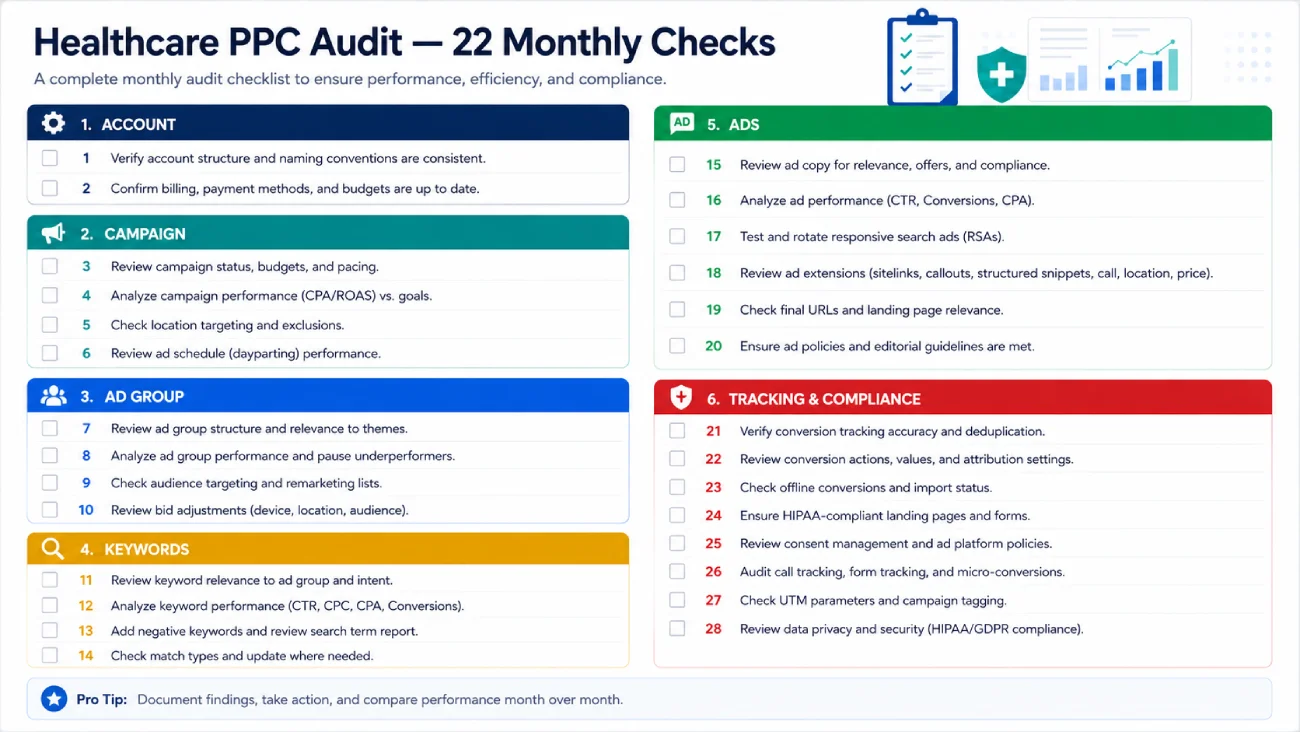
How to Audit a Healthcare Google Ads Account: The 22-Check Framework
Organised by account layer; from account-level settings down to tracking; so each problem is fixed at the right level rather than patched downstream.
The 22 checks follow this structure: Account (1-4), Campaign (5-8), Ad Group (9-10), Keywords (11-13), Ads (14-16), Landing Pages (17-18), Tracking and Compliance (19-22).
Download the google ads audit template and google ads account audit checklist as a working XLSX at the end of this post. The ppc audit template covers all 22 checks in a format you can share with a team or use as a monthly review record.
All 22 Checks at a Glance
Account layer:
- Check 1: Policy compliance and account-level restrictions
- Check 2: Conversion tracking is firing and recording values
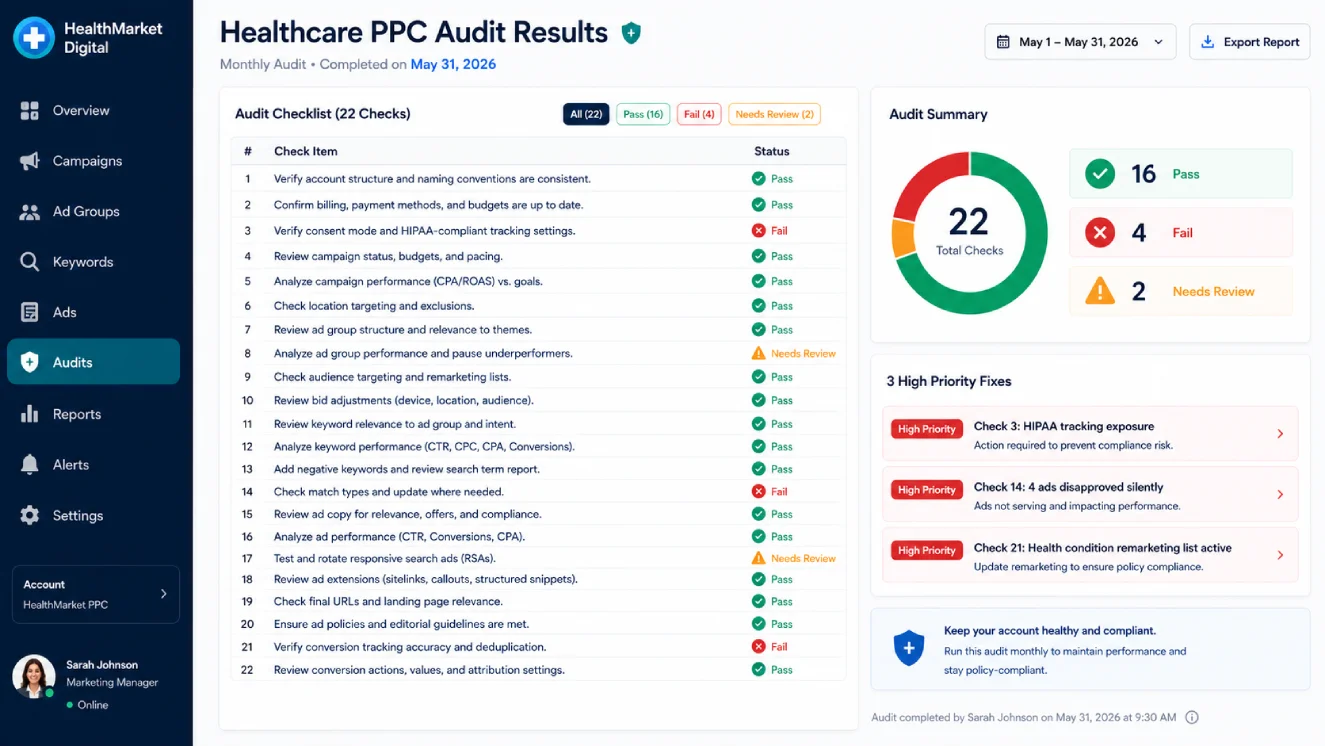
- Check 3: HIPAA-safe tracking architecture confirmed
- Check 4: Google Analytics linked and data flowing
Campaign layer:
- Check 5: Budget pacing and month-to-date spend
- Check 6: Campaign goal matches the bidding strategy
- Check 7: Performance Max placements and search term coverage
- Check 8: Geographic targeting matches the practice catchment area
Ad Group layer:
- Check 9: Ad group structure maps to service lines
- Check 10: Quality Score by keyword
Keyword layer:
- Check 11: Search term report; 90 days, sorted by cost with zero conversions
- Check 12: Negative keyword list coverage
- Check 13: Match type distribution
Ad layer:
- Check 14: Ad approval status; no silently disapproved ads
- Check 15: Responsive search ad asset performance ratings
- Check 16: Automatically created assets in restricted categories
Landing page layer:
- Check 17: Ad destination URL resolves and matches the ad promise
- Check 18: Landing page is not the homepage
Tracking and compliance layer:
- Check 19: Conversion actions are current and conversion windows are set correctly
- Check 20: Call tracking vendor BAA confirmed
- Check 21: Audience lists do not use health condition attributes
- Check 22: Impression share and auction insights review
Account Layer Checks (1-4)
Check 1: Policy Compliance and Restricted Categories
The first check on any healthcare Google Ads account is whether the account is operating in a restricted category and whether it has the appropriate certification.
Google’s healthcare and medicines policy places the following services in restricted categories requiring certification before ads can run: online pharmacies, telemedicine providers, addiction treatment centres, abortion services, prescription drug advertisers, and certain medical devices.
Being in a restricted category without certification does not always mean the account is suspended; it means ads run in “Eligible (limited)” status, serving only in approved locations and not at full volume.
Where to check: Google Ads > Account > Policy manager. Also check each campaign’s approval status in the “Status” column. A campaign status of “Eligible (limited)” indicates a restriction is active.
| Certification Type | Who Needs It | Third-Party Accreditation Required |
|---|---|---|
| Online Pharmacy | Any site dispensing or selling prescription medications online | LegitScript Healthcare Merchant Certification |
| Telemedicine / Prescription Drug Services | Platforms offering online consultations with prescription capability | LegitScript certification + Google application |
| Addiction Services | Treatment centres advertising substance use recovery | LegitScript certification |
| Abortion Services | Reproductive health providers in US, UK, Ireland | Google verification — location-specific |
| Pharmaceutical Manufacturer | Manufacturers promoting OTC or prescription drugs | LegitScript or NABP depending on product |
| Health Insurance | Insurance carriers advertising plans | Google verification + state licensing |
For most hospital groups, specialty clinics, and medical practices (not pharmacies, not telemedicine platforms with prescribing capability), the account will operate under the general healthcare restrictions rather than a specific certified category.
The key checks for this group: no unapproved health claims in ad copy, no personalised advertising restrictions being violated, and landing page content consistent with what the ads promise.
[COMPLIANCE NOTE] October 2025 update: Google changed the Restricted Drug Terms policy to allow non-promotional use of prescription drug terms in ads and landing pages; for example, a public health announcement or academic reference.
The certification requirement for keyword targeting those terms remains unchanged. Verify the current policy page at the time of publishing; Google updates this policy regularly, and the specifics have changed three times in the past 12 months.
Check 2: Conversion Tracking Is Firing and Recording Values
Where to check: Google Ads > Goals > Conversions. Look at the “Status” column for each conversion action. “Recording conversions” is the only acceptable status.
“No recent conversions” means either the tag has broken or the conversion action is no longer being triggered. “Inactive” means the action exists but has never recorded.
[PASS LOOKS LIKE] At least one conversion action with status “Recording conversions” and a conversion value assigned. The value should reflect the actual revenue or estimated lead value, not the default 1.00.
[IF IT FAILS] Status shows “No recent conversions”: check that the tag is still on the confirmation page and that no CMS update removed it. Use Tag Assistant to verify the tag fires on a test conversion.
Status shows “Unverified”: the tag was created but has never fired; check the tag implementation.
Check 3: HIPAA-Safe Tracking Architecture
[COMPLIANCE NOTE] Everything in this section is general information about risk and control patterns, not legal or compliance advice. Your practice’s counsel or compliance officer, not your PPC agency, determines what meets your HIPAA obligations.
The agency configures the technical controls; compliance sign-off stays with the covered entity.
Standard Google Ads conversion tags are not designed to handle Protected Health Information (PHI), and Google does not sign a Business Associate Agreement (BAA) for its advertising products.
The compliance risk is not the tag itself: it is what the tag transmits. PHI enters the tracking pipeline through two routes: URL paths that contain condition or treatment references, and form field values passed to tracking scripts.
The US Department of Health and Human Services Office for Civil Rights clarified in its December 2022 bulletin that tracking technologies transmitting PHI to third parties without proper authorisation constitute a HIPAA violation, with penalties up to $50,000 per violation. This applies to standard Google tag implementations on patient-facing pages.
The safe architecture pattern for healthcare conversion tracking in 2026:
- Route conversion events through a server-side pipeline, not a browser-side pixel, before any data reaches Google Ads. The server strips or hashes all PHI (name, email, phone, IP address, health condition indicators in URL paths) before the conversion signal is sent.
- Use GCLID-only offline conversion import as the lowest-risk option. The Google Click Identifier carries no PHI; importing it server-side with a conversion value gives Google the signal it needs to optimise without transmitting patient data.
- If using Enhanced Conversions: sending hashed patient email alongside a conversion event that signals a health condition creates PHI exposure, because Google holds the capacity to match hashes to known users. GCLID-based offline import is the safer path for covered entities.
- Any vendor in the tracking chain that processes PHI in transit must sign a BAA. This includes the server-side tagging platform, the cloud hosting provider, and any CDP between the website and the ad platform. Google does not sign BAAs for Google Ads. As of mid-2026, Meta does not sign BAAs for its advertising products either.
- Call tracking: call recording and transcription of patient calls create PHI that must be handled under a BAA. Confirm the call-tracking vendor will sign a BAA, verify recording consent handling for your state or jurisdiction, and confirm call transcripts are not being pushed into ad platforms. CallRail’s HIPAA mode requires specific configuration; verify it is enabled if CallRail is in the stack.
[PASS LOOKS LIKE] Server-side conversion pipeline confirmed. No PHI in URL paths reaching ad platforms. GCLID offline import configured.
BAA in place with every vendor touching PHI in transit. No standard browser-pixel firing on patient-facing pages.
[IF IT FAILS] Standard Google tag firing on appointment confirmation pages or pages with health condition indicators in the URL (example: /book-appointment/orthopedic-knee-pain/).
No BAA with the tagging vendor. CallRail running without HIPAA mode. PHI in Enhanced Conversions payload.
Check 4: Google Analytics Linked and Data Flowing
Where to check: Google Ads > Linked accounts > Google Analytics. Confirm the property is linked and that GA4 data appears in the Google Ads interface.
Also check that the GA4 property is not using Google signals for a healthcare account; Google signals can inadvertently create remarketing lists from health-sensitive sessions. Disable Google signals on pages where patient health information is present.
Campaign Layer Checks (5-8)
Check 5: Budget Pacing and Month-to-Date Spend
Where to check: Campaigns tab, “Budget” column, “Impr. share lost (budget)” column. A campaign losing more than 20% of impression share to budget in a high-performing month is leaving confirmed intent unserved.
A campaign not spending its budget with high impression share is either in a low-volume market or targeting the wrong keywords. In healthcare accounts, budget pacing issues compound faster than in other verticals because appointment volume is not linear.
A hospital group running seasonal campaigns (flu vaccination, annual health checks) may need to front-load budget in weeks 1-2 of the month rather than run at a flat daily rate. Check pacing weekly, not monthly.
Check 6: Campaign Goal Matches the Bidding Strategy
A campaign optimising for Maximise Clicks with a lead-generation objective is optimising for the wrong thing. In healthcare, where the distinction between a form fill, a qualified enquiry, and a booked patient matters significantly for ROI, the bidding strategy must be connected to the conversion action that reflects real patient acquisition.
For the correct goal setup framework, see setting up Google Ads goals properly. Check that each campaign’s bidding strategy matches its conversion goal and that Target CPA is set against patient-value conversions, not proxy metrics like page views.
Check 7: Performance Max: Placements, Exclusions, and Restricted Categories
Performance Max reduces visibility into where ads serve, which matters more in a restricted category than in e-commerce. An off-target placement in healthcare is not just wasted spend; it is potential policy exposure.
For how AI-powered campaign types are changing PPC management generally, see how AI is changing PPC management. For healthcare accounts specifically, three PMax checks are non-negotiable each month:
- Brand exclusions: confirm your brand terms are excluded from PMax so the campaign is not cannibalising branded search campaigns with higher intent and lower CPA.
- Account-level negative keywords: PMax does not accept campaign-level negatives in the standard interface. Push negatives through the account-level shared library or request them via Google rep. Check that the healthcare-specific negative categories below are in this list.
- Automatically Created Assets: if PMax is generating ad copy using AI, check the asset library for copy that makes health claims not present on your landing pages. In a restricted category, AI-generated health claims in ad text can trigger disapprovals. Disable automatically created assets if copy review capacity does not exist.
Check 8: Geographic Targeting Matches the Practice Catchment Area
Where to check: Campaign settings > Locations. Also check: Reports > Predefined reports > Geographic. The geographic report shows where clicks are actually coming from, which may differ from the target setting if “Presence or interest” is selected rather than “Presence only.”
In healthcare accounts, the most common geographic waste is serving to users interested in the practice area rather than physically present in it. Set all campaigns to “Presence only” and export the geographic report monthly to verify actual click geography.
Spend outside the catchment area and outside the country targeting is a fast indicator of a mis-set location option.
Keyword Layer Checks (11-13): Wasted Spend Triage
Check 11: Search Term Report Analysis: The Fastest Wasted Spend Finder
The search term report is the single fastest tool for finding wasted spend. Filter: last 90 days, sort by Cost descending, filter to Conversions = 0.
Are your ad campaigns paying for themselves?
A large share of Google and Meta ad budgets goes to campaigns that quietly underperform. Our free review shows you what to cut and what to scale.
No commitment, just a clear picture of where you stand.
In healthcare accounts specifically, the common patterns that drain budget break into five categories that are different from those in general PPC accounts:
| Category | Examples | Why They Appear in Healthcare Accounts | Action |
|---|---|---|---|
| Symptom and self-diagnosis queries | “does leg pain mean blood clot,” “symptoms of appendicitis” | Broad match keywords on treatment terms trigger these. The searcher is not booking; they are panicking. | Negative all symptom-phrased queries at account level |
| Job-seeker and career queries | “nurse practitioner jobs,” “hospital receptionist salary” | Broad/BMM on “healthcare” or specialty terms triggers career intent. | Negative: jobs, careers, salary, hiring, vacancy, employment |
| Free and charity queries | “free clinic near me,” “charity dental treatment” | Location + service terms in broad match. | Negative: free, charity, nonprofit, grant, low income |
| DIY and home remedy queries | “home remedy for sinus infection,” “how to drain an abscess yourself” | General health keywords triggering information seekers. | Negative: home remedy, natural cure, how to treat at home, DIY |
| Education and research queries | “nursing school near me,” “medical school admission,” “healthcare MBA” | Broad match on institution or service terms. | Negative: school, degree, course, study, admission, MBA |
[SKYMOON INFOTECH ANALYSIS] In the healthcare accounts Skymoon Infotech audits on intake, the median waste percentage from these five categories is 18-35% of total spend.
The job-seeker category is consistently the largest silent drain in hospital accounts bidding on broad “healthcare” terms.
Building the negative list from these five categories in month one is the fastest ROI improvement available in most inherited accounts.
Check 12: Negative Keyword List for Healthcare PPC
Download the complete negative keyword list for healthcare PPC accounts as part of the 22-check google ads audit template at the end of this post. The healthcare-specific negative list includes the five category families from Check 11 plus competitor brand terms, insurance and billing queries, and regulatory or legal queries that generate clicks but no appointments.
Where to check: Shared library > Negative keyword lists. Every campaign should apply at least the healthcare master negative list. PMax campaigns require account-level negatives (pushed through the interface via Google rep or through the account-level negative keyword section if available for your account type).
Check 13: Match Type Distribution
Where to check: Keywords tab, segment by Match type. A healthcare account running more than 60% of its spend on broad match with no negative keyword structure is paying a premium for irrelevant traffic.
The appropriate match type split for a mature healthcare account: phrase match and exact match for the core treatment and appointment terms, broad match only for prospecting campaigns with strong negative lists.
Exact match on brand terms is non-negotiable. A competitor or affiliate bidding on your brand terms without brand exclusions in your own campaigns will appear above your ads for your own branded searches.
Ad Layer Checks (14-16)
Check 14: Ad Approval Status: Silently Disapproved Ads
Healthcare ads are disapproved silently. The account keeps running other ads, the campaign status shows Active, and no alert is sent unless account-level email notifications are configured for policy disapprovals. A disapproved ad is simply excluded from the auction without notification.
Where to check: Ads view, filter Status = “Disapproved” or “Eligible (limited).” Read the policy reason for each disapproval before attempting a fix. The three most common reasons in healthcare:
- Unapproved health claims: ad copy makes an efficacy claim (“guaranteed results,” “cure,” “eliminate pain completely”) that the landing page does not substantiate or that Google’s policy prohibits outright. Fix: remove the claim from the ad or add substantiation on the landing page.
- Missing certification: the account is advertising in a restricted category (telemedicine, addiction services) without the required certification. Fix: apply for the certification or remove the restricted content from the ad.
- Destination mismatch: the landing page content does not match the ad promise. A surgical services ad landing on the practice homepage rather than a procedure-specific page will trigger this. Fix: align destination to ad promise.
[COMPLIANCE NOTE] If an ad is disapproved for a health claim, do not simply rephrase the claim and resubmit without also reviewing the landing page. Google reviews landing page content alongside ad text.
A disapproval for an unapproved health claim on a landing page that repeats the claim will result in a further disapproval and, if repeated, potential account-level action.
Check 15: Responsive Search Ad Asset Performance Ratings
Where to check: Ads view, click on a responsive search ad, view the “Asset details” panel. Google rates each headline and description as “Best,” “Good,” or “Low.” Assets rated “Low” consistently are being served rarely and pulling down the ad’s overall performance.
In healthcare RSAs, the most common low-rated assets are: generic service names without location or differentiator (“Quality Healthcare Services”), price-forward headlines in a market where price is not a primary search intent, and headlines that duplicate each other semantically across multiple positions.
Replace low-rated assets with specific service differentiators, credential signals (NABH accreditation for India, board certification for the US), and action-forward language.
Check 16: Automatically Created Assets in Restricted Categories
Google’s Automatically Created Assets (ACA) feature generates additional ad copy using AI by extracting content from landing pages and other signals. In a restricted healthcare category, AI-generated copy can produce health claims that violate policy even when the advertiser’s own approved copy does not.
Where to check: Campaigns > Settings > Automatically created assets. If ACA is enabled on any campaign in a restricted category, review the AI-generated assets in the Ad library or the asset report. Disable ACA on any campaign where ad copy cannot be manually reviewed before serving.
Landing Page Checks (17-18): The Hard Stop
These two checks are the audit boundary. This post stops at the landing page match; the same scope applies whether you call this a healthcare google ads audit, a medical ppc audit, or a google ads account audit checklist.
Everything beyond form design, page speed, trust signals, and conversion rate optimisation is covered in the full healthcare CRO audit checklist. Cross that boundary here, and we recreate the cannibalization the scope split is designed to avoid.
Check 17: Ad Destination URL Resolves and Matches the Ad Promise
Test every destination URL for every active ad. A 404 or redirect to a different page is an active conversion failure and a Quality Score drag. In healthcare, also check that the destination page is specific to the service advertised.
A knee replacement ad landing on the hospital homepage is a mismatch that raises bounce rate and lowers conversion rate without triggering a formal policy issue. For what happens on that landing page once the visitor arrives, see the full healthcare CRO audit checklist.
Check 18: Landing Page Is Not the Homepage
The homepage is not a landing page. This check fails on approximately 40% of healthcare accounts that Skymoon Infotech audits on intake. A visitor who clicks an ad for “laparoscopic cholecystectomy” and lands on a general hospital homepage has to navigate to find what they came for. Most do not.
The audit check: every campaign should have at least one dedicated landing page per service line. Record the destination URL for every active campaign and verify it resolves to the correct service page.
Tracking and Compliance Checks (19-22)
Check 19: Conversion Actions Are Current
Conversion actions accumulate in Google Ads accounts over time. An audit of a three-year-old account will commonly contain five or more conversion actions for campaigns that no longer run, forms that no longer exist, and events that were tested and never removed.
Each inactive conversion action with “Include in Conversions” set to On distorts the Smart Bidding model.
Where to check: Goals > Conversions. For each conversion action: Is the landing page or event it tracks still live? Is the status “Recording conversions” or “No recent conversions”?
Is the conversion window appropriate for the healthcare sales cycle? Most appointment bookings happen within 7-14 days of the click, not 90? Is the conversion value set to the actual lead value or procedure revenue, not the default 1.00?
Check 20: Call Tracking Vendor BAA Confirmed
Call tracking does not itself create a HIPAA problem. Call recording and transcription of patient calls do, because the recording constitutes PHI when it captures health information. The audit check: confirm that the call-tracking vendor has signed a BAA with the practice.
CallRail requires specific configuration to enable HIPAA mode; verify this setting is active. Verify recording consent handling for each state where calls are received.
Confirm that call transcripts are not being automatically exported to Google Ads as Enhanced Conversions data. The GCLID import method is the safer path for call conversion tracking in healthcare.
Check 21: Audience Lists Do Not Use Health Condition Attributes
Google’s personalised advertising policy prohibits targeting or re-targeting users based on sensitive health information.
This means: no remarketing lists built from pages about specific conditions or treatments (example: targeting everyone who visited /fertility-treatment/), no Customer Match uploads containing patient data without explicit consent and data handling controls, and no use of health interest segments from Google’s audience library for targeting or bid adjustments.
Where to check: Shared library > Audience manager. Review every audience list applied to healthcare campaigns. Any list built from health-condition pages is a policy risk.
Broad practice-level remarketing (everyone who visited the site) is generally acceptable; condition-specific page visitors is not.
Check 22: Impression Share and Auction Insights
Impression share tells you what fraction of eligible auctions your ads entered. A top-of-page impression share below 50% on branded terms is a serious problem; competitors or affiliates may be winning your own brand auctions.
An absolute top impression share below 30% on high-converting exact match keywords indicates either a budget constraint or a Quality Score problem.
Auction insights show who you are competing with. In healthcare, audit insights monthly. If an aggregator (Zocdoc, Healthgrades, Practo in India) is consistently appearing above your ads for your own speciality terms, you are paying to compete with a platform that aggregates multiple providers, including potentially your own listings.
The structural audit checks that connect to impression share, account structure, Quality Score, and bidding strategy alignment are covered in the common patterns we see in underperforming PPC accounts.
Healthcare PPC Cost Per Lead: What to Audit Against
The question every practice manager asks when reviewing a PPC report is whether the cost per lead is good. The short answer: there is no universal benchmark because a lead in healthcare is not a patient.
We use a three-stage funnel; form fill (what Google Ads reports as a conversion), qualified enquiry (real contact, right condition, serviceable geography), and booked patient (attended consultation).
The patient CPA is the number that matters for ROI; the form-fill CPA is the number the reporting dashboard usually shows. For the full calculation model, see how we calculate healthcare PPC ROI.
For the purpose of the monthly audit, track all three numbers and flag when the ratio between form-fill conversions and confirmed appointments changes significantly.
[SKYMOON INFOTECH ANALYSIS] In the anonymised healthcare Google Ads campaigns Skymoon Infotech manages, the confirmed patient CPA runs at approximately Rs 6,006 on an Rs 1,44,136 total spend, against 240 form-fill leads that became 24 confirmed patients (10% lead-to-patient rate).
The form-fill CPA reported in Google Ads (Rs 601) is 10x lower than the patient CPA. Presenting the Rs 601 figure to leadership as the cost per acquisition understates the actual economics by an order of magnitude.
The monthly audit should flag any significant drift in the lead-to-patient conversion rate, not just the in-platform CPA.
Healthcare PPC in India: Additional Audit Checks
For Indian healthcare advertisers, the audit checklist above applies in full. Two additional compliance checks are mandatory. For the full India-specific strategy context, see the guide on healthcare PPC in India.
ASCI compliance: The Advertising Standards Council of India’s code requires that all health advertising claims be truthful, substantiated, and not misleading. Outcome claims (“best results,” “guaranteed cure”) are prohibited.
Scientific or research-based claims must disclose the source and date. The audit check: review every active ad and landing page for unsubstantiated outcome claims. Testimonials that imply specific health outcomes are prohibited under both ASCI and the Medical Council of India’s ethical guidelines.
Prescription drug advertising: India’s Drugs and Cosmetics Rules 1945 prohibit advertising of Schedule H, H1, and X drugs (prescription drugs, controlled substances) across all platforms, including digital. In April 2026, Google updated its India policy to allow certified online pharmacies to promote prescription drug services through LegitScript certification, with applications opening when the policy goes live.
For clinics and hospitals (not pharmacies), the rule is unchanged: do not run ads for prescription drug names. The audit check: search active keywords and ad copy for drug names that fall under Schedule H or H1.
Ready to turn this into an actual growth plan?
Our team builds strategies across SEO, paid advertising, AI search visibility, and website performance, matched to your budget and your goals, not a generic package.
- A real thirty minute call, not a sales pitch
- Recommendations specific to your business
- A short list of what to fix first
Download the Healthcare PPC Audit Template
DOWNLOAD: Healthcare PPC Audit Template.
If you would prefer Skymoon Infotech to run this audit on your account rather than doing it in-house, the healthcare PPC service page describes how we approach new account audits and what we typically find.
Frequently Asked Questions
How often should a healthcare practice audit its Google Ads account?
Three cadences: monthly (spend pacing, search terms report, disapproved ads, conversion tracking firing), quarterly (account structure, bidding strategy fit, landing page alignment, audience list review), annually (full compliance review including certification status, BAA audit, and personalised advertising policy check).
Healthcare needs the monthly cadence more than other verticals because policy disapprovals arrive without warning and pause campaigns silently.
Why do my medical or healthcare ads keep getting disapproved?
Most healthcare disapprovals trace to the restricted-category policy, not ad copy quality. Triage in this order: check the policy category in the Policy manager first (is certification required?), then review the landing page for unapproved health claims, then read the exact policy reason in the disapproval notice.
Unsubstantiated efficacy claims, missing certifications, and destination mismatches are the three most common causes. Check the Google healthcare and medicines policy page; it is updated frequently.
Is Google Ads conversion tracking HIPAA compliant?
Standard Google Ads tags are not designed for PHI and Google does not sign a BAA for advertising products. The compliance failure is not the tag itself: it is sending data that allows a person to be identified alongside their health condition or treatment intent.
Use GCLID-based offline conversion import, strip PHI from URL paths, and ensure every vendor in your tracking chain has signed a BAA. This is general information; your compliance officer signs off, not the agency.
What is a good cost per lead for healthcare PPC?
There isn’t a single universal figure because a form fill isn’t considered a patient. Track three numbers: form-fill CPA (as reported by Google Ads), qualified-enquiry CPA (form fills that make contact and meet clinical criteria), and booked-patient CPA (patients who attend a consultation).
In the campaigns Skymoon manages, the form-fill CPA is approximately 10x lower than the patient CPA. Audit against your own trailing 12 months, not an industry table.
How do I find wasted spend in a healthcare Google Ads account fast?
Run the search term report for the last 90 days, sort by Cost descending, filter to zero conversions. In healthcare specifically: look for symptom and self-diagnosis queries, job-seeker queries (nurse jobs, hospital careers), free and charity queries, and DIY health queries.
These four categories account for the majority of wasted spend in most healthcare accounts we audit. The geographic report sorted by cost with zero conversions is the second-fastest check.
Should healthcare campaigns use Performance Max?
Performance Max reduces control over placements and search terms, which matters more in a restricted category where an off-target placement creates compliance exposure.
If running P-Max, confirm brand exclusions, push account-level negatives (P-Max cannot take campaign-level negatives directly), and disable automatically created assets if ad copy cannot be reviewed before serving.
Do not launch PMax in a certified restricted category without confirming the settings with a healthcare-specialist PPC manager.
What negative keywords should every healthcare PPC account have?
Five categories:
(1) employment terms: jobs, careers, salary, hiring;
(2) free and charity terms: free clinic, charity treatment, low income;
(3) DIY and home remedy terms; home remedy, natural cure, treat at home;
(4) education and research terms; medical school, nursing degree, course, MBA;
(5) severe symptom terms where the ethical response is emergency services, not a paid appointment.
Download the full healthcare negative keyword list in the template above.
Can I audit my own Google Ads account without an agency?
A practice manager can run the 22 checks in this post without agency help. Checks 1-16 and 18-22 are navigable by someone familiar with the Google Ads interface.
Check 3 (HIPAA-safe tracking architecture) and Check 21 (audience list compliance) are the two where specialist input is genuinely valuable; not because the checks are hard to run, but because the fixes often require a developer and a compliance review.
Does call tracking break HIPAA?
Call tracking itself does not. Call recording and transcription of patient calls do, because the recording constitutes PHI when it captures health information.
The audit check: confirm the call-tracking vendor will sign a BAA, verify recording consent is handled for your state or jurisdiction, and confirm call transcripts are not being pushed into ad platforms.
CallRail requires specific configuration to enable HIPAA mode; verify it is active.
Running This Audit: What to Expect
A first-pass run of these 22 checks on a previously un-audited healthcare account takes three to four hours. Checks 11 and 12 (search term report and negative keyword list) often surface enough wasted spend that the first month’s savings cover the audit time.
Check 3 (HIPAA tracking) and Check 14 (ad disapprovals) are the checks with the highest severity when they fail.
The monthly maintenance run, once the account has been audited and corrected, takes forty-five minutes to ninety minutes. The checks that change most often month-to-month are 5 (budget pacing), 11 (search terms), and 14 (disapprovals).
If you want Skymoon Infotech to run this audit on your account, the healthcare PPC service page covers how we approach inherited accounts and what a first-month audit typically finds.
Let's turn this into results for your business.
SEO, paid advertising, AI search visibility, website design, and conversion optimization, all under one roof, all pointed at the same goal: revenue.