
Most advice on Google Business Profile for doctors starts with photos and posts. Google’s guidelines start earlier, with a harder question: which profiles should exist at all?
Google Business Profile for doctors helps eligible practices show accurate location, contact and appointment information on Google Search and Maps.
The SEO checklist that finds what is actually holding you back
Twenty seven checks covering technical SEO, on page structure, and link strategy. The same list our team runs before quoting any new client.
The profile itself is free. Advertising and optional management services have separate costs. You may know the product as Google My Business for doctors.
The name changed, but patients still need the same facts: who you treat, where you work and how to book.
Patients are reading what you publish. In BrightLocal’s 2026 survey of 1,002 US adults, 97% read reviews for local businesses and 41% always do.
This guide covers Google Business Profile for clinics and for individual doctors in the US, UK and India. Every rule comes from Google Business Profile Help pages checked on 9 October 2026.
FTC, HHS and BrightLocal sources are linked inline. Where Google’s pages say nothing, we say so instead of guessing.
Clinic and Doctor Separate Google Business Profiles: What Google Allows
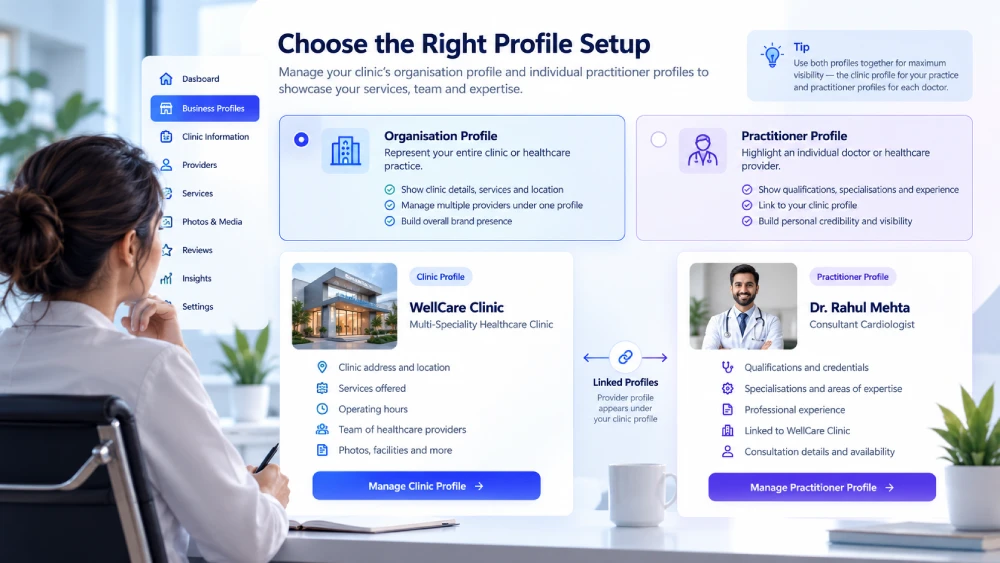
A Google Business Profile for medical practice locations represents the organization. A practitioner profile represents an eligible, public-facing professional.
Whether clinic and doctor separate Google Business Profiles are allowed depends on who works where.
Google’s guidelines for representing your business require a physical location that customers can visit, or a business that travels to them. A rented mailing address the business does not operate from is not eligible.
An online-only telehealth business does not qualify simply because it has a registered address.
For practitioners, the test is direct contact. Google says they must be reachable at the verified location during stated hours. Support staff should not create their own profiles.
Three questions that decide your structure
- Can patients meet this doctor in person at this address during stated hours? If not, the doctor does not get a profile.
- Do other practitioners work at the same location? If yes, the organization holds its own profile and each doctor’s profile carries only the doctor’s name.
- Is a hospital department a distinct, public-facing entity? Google says such departments should have their own page.
Use the table below alongside Google’s guidelines. It condenses the rules we checked into the situations clinics ask about most.
| Your situation | Profile approach |
|---|---|
| One doctor represents a branded practice at one location | Google recommends one shared profile named in the format Brand: Practitioner. |
| Several eligible doctors work at one clinic | Maintain the clinic profile. Each eligible doctor may have a profile with only their own name, not the organization name. |
| One doctor offers several specialties | Use one practitioner profile. Google says practitioners should not have multiple profiles to cover every specialization. |
| A hospital department operates as a distinct entity | It can have its own page, such as a named dermatology department. |
| A clinic operates several physical locations | Assess each location separately. Use its real address, contact details and hours. |
| A practice provides online-only consultations | Do not use an office address to imply an eligible patient-facing location. |
Consider an illustrative US example. A dermatology practice has two public-facing physicians who can be contacted at the location. The organization and the two doctors can each hold a profile.
Each appointment destination should help patients reach the correct provider.
A UK private GP surgery should run the same eligibility checks before separating practice and clinician. An Indian clinic should also distinguish doctor availability from reception hours.
These examples explain structure. They do not establish eligibility for a particular business.
Step 1: Find an Existing Listing Before Creating One
Search Google Maps for your practice name, address and each eligible doctor’s name. Check variations, previous names and listings created before your current team joined.
If the correct listing exists, follow its ownership or claim process. If another account manages it, request access. A replacement listing adds a second ownership problem on top of the first.
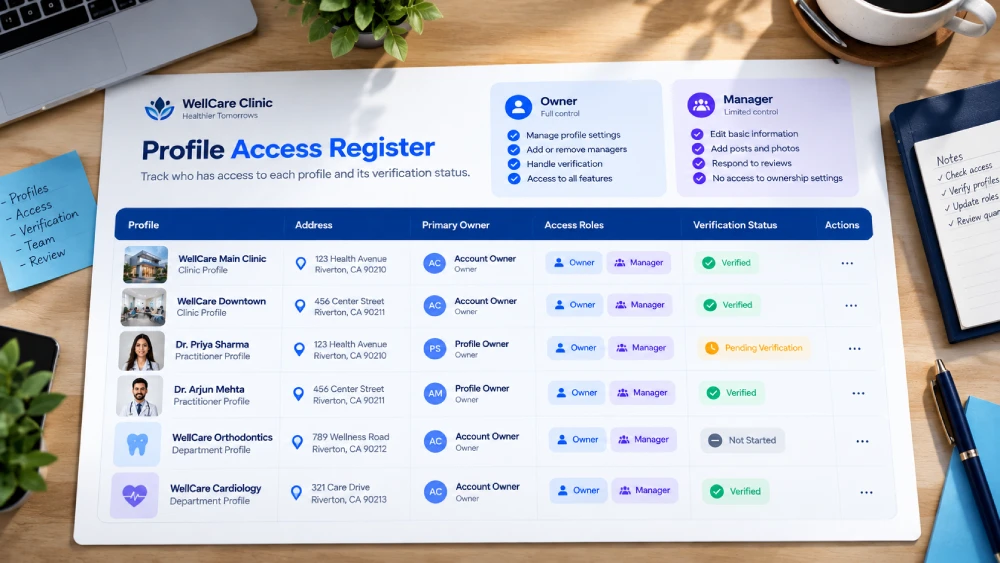
When no suitable listing exists, use Google’s add-business flow with an authorized Google Account. Then start an access register. It is a one-page record that outlasts any single receptionist, manager or agency.
| Register field | What to record | Why it matters |
|---|---|---|
| Profile represented | The clinic or the named practitioner. | Stops two people editing the same listing for different reasons. |
| Public name and address | Exact text as shown on signage and the website. | Resolves inconsistencies before submission. |
| Primary owner | A practice-controlled Google Account. | Keeps control if an agency or employee leaves. |
| Authorized managers | Individual accounts with the lowest access they need. | Avoids shared passwords. |
| Verification status | Method offered, date submitted, outstanding requests. | Shows whether performance data and links are available. |
The practice should retain primary ownership. Give team members individual access instead of sharing passwords.
A manager can then handle routine updates without controlling user access.
For example, an agency may manage your information and reviews. Your practice still needs an owner account that remains accessible after the engagement ends.
Step 2: How to Set Up Google Business Profile for a Clinic
If you need to know how to set up Google Business Profile for a clinic, prepare your details first. Use signage, the website and reception records to resolve inconsistencies before you submit anything.
Use the real-world name
Use the name patients recognize. Do not add service keywords, locations or promotional claims unless they belong to the genuine business name.
Google allows a professional title or degree, such as Dr. or MD, in a practitioner’s profile title. For a doctor inside a multi-doctor organization, use the doctor’s name without the organization name.
Pick the best Google Business Profile category for a clinic
The best Google Business Profile category for a clinic depends on what that clinic actually is. Choose the most specific accurate option in Google’s category selector.
The choice carries weight. Whitespark calls the primary category the number one local ranking factor in its 2026 survey. It ranks additional categories eighth.
A practitioner and a medical centre may need different primary categories. A specialty label can suit an eligible specialist, while a broader clinic label can suit the organization.
Available labels vary, so use the options your profile shows. Add secondary categories only for services you provide, and review them every six months as Whitespark advises.
Check the address, phone and hours
Place the map pin at the correct patient entrance where practical. Confirm building, suite, floor and postcode or ZIP code.
Use a phone number that reaches the listed clinic or doctor. A location-specific number reduces confusion for multi-location practices.
If you run several sites, our guide to keyword architecture for multi-location hospital networks explains how location pages should be organized.
Set hours patients can rely on. A doctor available only on Tuesday evenings should not inherit the clinic’s full weekly schedule.
Record holiday changes and temporary closures, and enter split sessions as separate opening periods.
Write a factual description of the practice and its services. Avoid unsupported treatment claims and promises about clinical outcomes.
Step 3: Google Business Profile Verification for Clinic Locations
Google Business Profile verification for clinic locations uses the options Google assigns to each business.
Google states that verification methods are determined automatically and cannot be changed. You cannot pick a method just because another clinic used it.
Your competitors might be outranking you for a fixable reason
Most sites lose the majority of their potential traffic to issues that take days, not months, to fix. Our free audit tells you what those are.
No commitment, just a clear picture of where you stand.
Google lists these methods: phone or text, email, live video call, mail and video recording.
Availability depends on business type, public information, region and business hours. In some cases you need more than one method.
| Method | What Google says | Clinic preparation |
|---|---|---|
| Phone or text | Answer the call or open the text with the code. Codes cannot reach IVR systems. | Use a line a person answers during the verification window. |
| You must be able to use the address on the verification screen. | Confirm the mailbox is monitored by an owner. | |
| Live video call | Only available within the business hours of your location. | Schedule a manager to be on site. |
| Google mails a verification code. Not available for all businesses. | Make sure mail reaches the named suite and floor. | |
| Video recording | Google recommends it when your business is eligible. | Record exterior signage and staff-only access without patients or records. |
Timing is the part teams get wrong. Google says verification reviews take up to five business days, and on rare occasions longer.
Most codes arrive within 14 days and expire after 30 days. Some profiles are verified instantly.
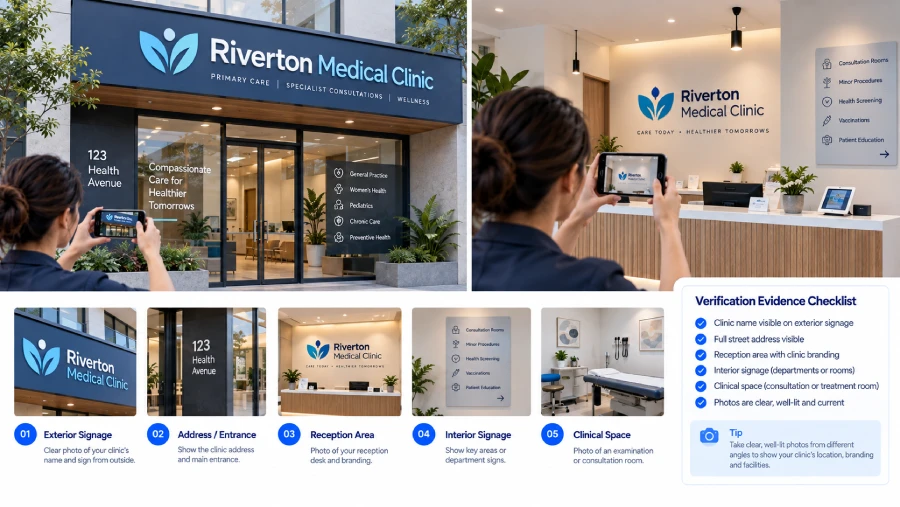
If video is offered, prepare evidence of the location, business operations and your authority to manage it. Keep patients, medical records and appointment screens out of the recording.
Exterior signage can establish the location. Authorized access to staff-only areas can show management control without exposing confidential records.
If verification fails, review the stated issue before resubmitting. Check whether the name, location or evidence conflicts with the profile. Keep the original listing while you resolve it.
Do not create duplicates as a shortcut, and do not promise your team a fixed approval date.
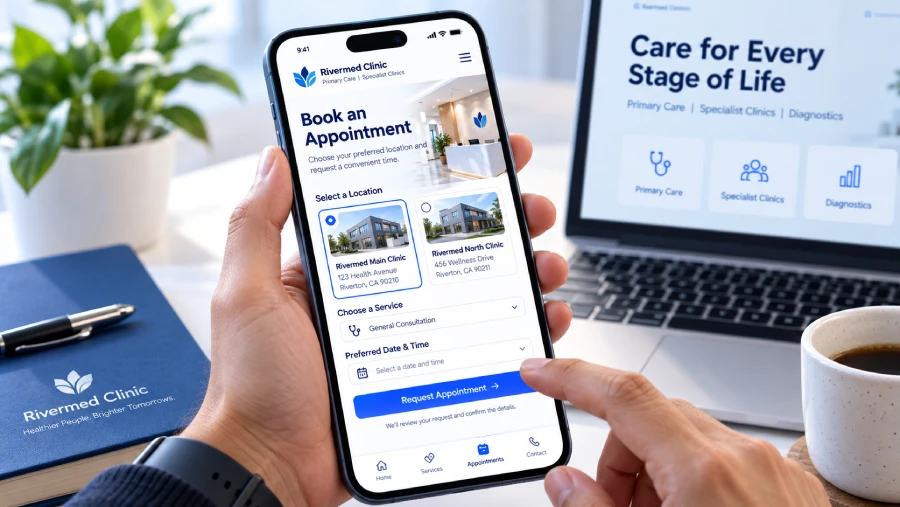
Step 4: How to Add Appointment Link to Google Business Profile
The website link should help patients understand the listed practice or doctor. For several locations, choose the relevant location page when one exists. Our guide to building a trust-first healthcare website covers how those pages should read.
Here is how to add an appointment link to Google Business Profile, based on Google’s help page for managing local business links:
- Go to your Business Profile. In Search, select Booking. In Maps, select Edit profile and then Booking.
- Select Add link (or Add another link), enter the URL and select Save.
- If several links appear, select Set preferred link, choose one and save.
- To remove a third-party booking link, use Remove Provider under Booking.
Three caveats from the same page matter for clinics. Some third-party links appear automatically from partners or Google data, so review what patients actually see.
Google allows up to 10 links per category. Local business links are not available through the Business Profile API or spreadsheet upload. Multi-location teams must edit them in the interface.
Test the complete booking journey
Open the public link on a phone. Check that it reaches the correct location and provider without unnecessary navigation.
Confirm patients can tell whether they are requesting an appointment or receiving a confirmed booking. Test form errors, confirmation messages and the reception follow-up process.
A working link can still lead to an unusable page. Review mobile responsiveness and loading speed with our Core Web Vitals guide.
Use generic campaign labels if your analytics setup supports them. Keep symptoms, patient names and appointment details out of tracking URLs.
Step 5: Add Useful Photos and Service Details
Google Business Profile optimization for clinics starts with information that helps someone visit and book. Complete the relevant fields your profile offers.
Photograph the exterior, entrance, reception and accessible routes where appropriate. A patient arriving for the first time should recognize the building.
Use recent images of the real location, and avoid patient faces, identifiable records and staged images presented as your premises.
Describe services you provide at that location. Check that appointment availability on the website matches what your team tells callers.
Assign one person to own updates. A new doctor, a relocated entrance or a changed phone number should trigger a profile review. A monthly information check is a practical routine. It is our operational suggestion, not a Google requirement.
Step 6: Request Reviews Without Incentives
Google Business Profile reviews for clinics must come from genuine experiences. Patients notice them. In a 2022 YouGov survey for Reputation, 72% of 1,000+ consumers read online ratings and reviews before considering a new provider.
Source: Reputation, 2022 Healthcare Trends Report (YouGov, 1,000+ consumers aged 27 to 64), reported by TechTarget, 9 February 2022.
Three bodies set the rules, and they cover different ground. Google’s policy defines incentivised reviews as ratings influenced by a payment, discount, or free goods or services.
Google’s guidance on getting reviews calls offering such incentives strictly prohibited.
The FTC rule on consumer reviews took effect on 21 October 2024. It bars conditioning incentives on a particular sentiment, and it bars suppressing reviews through false accusations, intimidation or unfounded legal threats.
One gap deserves honesty. The Google pages we checked do not spell out a rule on inviting only patients you expect to rate you highly. Treat that as a bias risk anyway. Offer the same neutral invitation to every patient, with no discounts, gifts or rewards.
An illustrative request could read: “If you want to share feedback, you can leave a review of your experience here.” Avoid wording that pressures anyone to mention a treatment, a doctor or a five-star rating.
Reply without discussing patient care
Public replies should not confirm patient status or disclose appointments, diagnoses or treatment details. The risk is real. In October 2019 a Dallas dental practice paid $10,000 to settle HHS Office for Civil Rights findings. Its replies to online reviews had revealed patients’ health information.
Replying still matters to patients. In the same Reputation survey, 65% said it is essential for providers to respond publicly to reviews. So reply, but keep the content generic and move care-related concerns to a private channel.
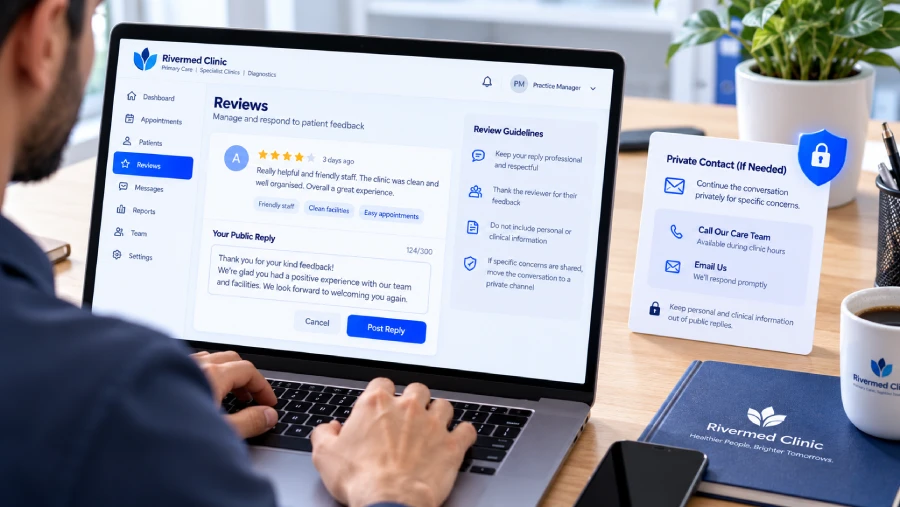
For example: “Thank you for sharing your feedback. Please contact our practice team so we can discuss your concern privately.” Ask your practice lead to check the process against local confidentiality rules.
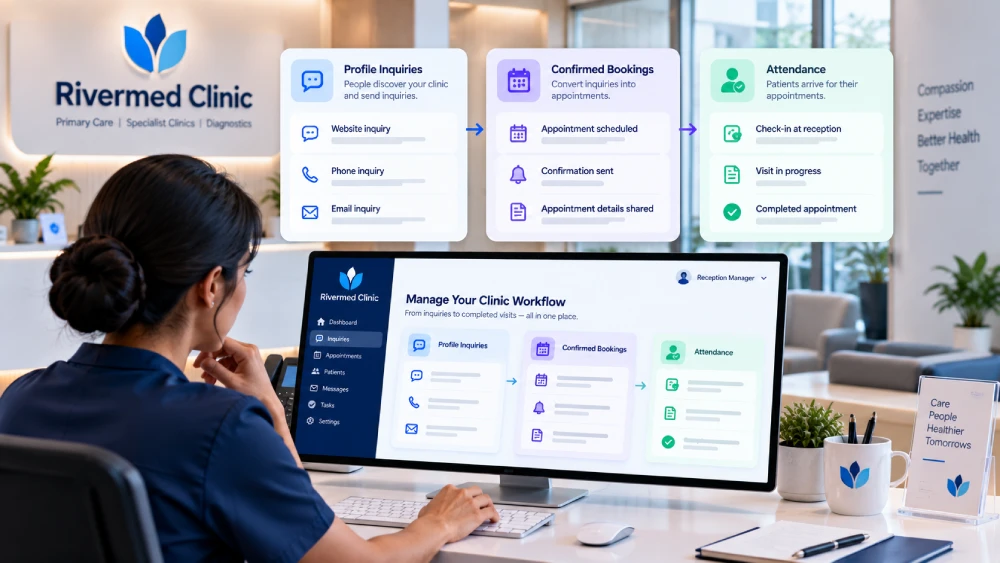
Step 7: Separate Profile Actions From Booked Appointments
A profile action is an intermediate signal. A website click does not establish that someone became a patient.
Google’s performance help page lists the metrics available: calls, messages, bookings, directions, website clicks and search terms. Several have conditions. Performance data is available only for verified profiles.
Call tracking needs a phone number on the profile, and bookings are counted only when managed through a booking provider.
Build a monthly measurement view with separate stages:
| Stage | What to record | Interpretation |
|---|---|---|
| Profile activity | Available website, call, direction or booking interactions. | Interest or attempted contact. Availability depends on the profile. |
| Appointment inquiry | Form submissions or reception inquiries, attributed where possible. | Requests that still need qualification and confirmation. |
| Confirmed booking | Appointments accepted by your scheduling team. | A booking can still be cancelled or missed. |
| Attended appointment | Attendance recorded in your practice system. | Use internal totals without exposing patient information in marketing reports. |
Use separate labels for the clinic website and booking links. Ask reception how new inquiries found you, then compare those answers with scheduling totals.
Some callers will not recall the source, and some patients use several channels.
Record that uncertainty instead of crediting every appointment to the profile. Compare consistent periods and note closures, holidays or booking changes.
For wider visibility planning, use our local SEO for doctors guide. It covers the search strategy beyond profile setup. If your clinic serves Indian patients, our healthcare SEO India guide adds market context.
Ready to turn this into an actual growth plan?
Our team builds strategies across SEO, paid advertising, AI search visibility, and website performance, matched to your budget and your goals, not a generic package.
- A real thirty minute call, not a sales pitch
- Recommendations specific to your business
- A short list of what to fix first
Profile Problems and First Fixes
| Symptom | Likely cause | First action |
|---|---|---|
| Two listings for one location | An older listing was never claimed or merged. | Search by name, address and past names. Request access before creating anything new. |
| No performance data appears | The profile is not verified. | Finish the verification method Google offers. |
| Verification option you expected is missing | Google assigns methods by business type, region and hours. | Try the other methods shown. Do not create a second profile. |
| A booking link you did not add is showing | Some third-party links are supplied by partners or automated data. | Review links under Booking. Remove a provider if needed. |
| A doctor shows the clinic’s full hours | Profile hours were copied from the organization. | Set the practitioner’s own available hours. |
Clinic Profile Completion Checklist
- Confirm the organization or practitioner is eligible.
- Check existing listings and resolve ownership access.
- Record the primary owner and managers in the access register.
- Use the real name and the most accurate category.
- Verify the address, patient entrance, phone and hours.
- Complete the verification process Google assigns.
- Test website and appointment links on a phone.
- Add current photos without confidential information.
- Set up a neutral review request and a reply process with no patient details.
- Separate profile interactions from appointments in reporting.
Keep this checklist with your access register. It should stay usable when a receptionist, manager or agency changes.
Frequently Asked Questions
Is Google My Business for doctors still available?
Google My Business is the former name of Google Business Profile. Clinics and doctors now manage eligible listings through the current product, which covers Search and Maps.
If an older guide mentions Google My Business for doctors, the same ownership, verification and review rules apply under the new name, though menu labels can differ.
Can a clinic and doctor have separate Google Business Profiles?
Yes, where both meet Google’s rules. When several practitioners work at one location, the organization sets up its own profile and each eligible practitioner can have one named only after the practitioner.
A sole practitioner with a branded practice should use one shared profile instead. Check the structure table before creating anything.
How much does a Google Business Profile cost?
The profile itself is free. Costs arise elsewhere: agency management, Google advertising and third-party booking software each carry separate charges.
Ask any provider which of those fees you are paying, and make sure your practice keeps the primary owner account regardless of who manages day-to-day updates.
Does every doctor need a separate Google Account?
Each person who manages a profile should use their own Google Account instead of sharing a password. That gives you a clear access record when staff or agencies change.
Account access does not decide eligibility, though. A doctor still needs to meet Google’s practitioner rules before receiving a separate listing.
Will completing the profile guarantee more patients?
No. Accurate information helps people contact you, but visibility and bookings depend on many factors outside the profile.
Measure inquiries, confirmed bookings and attended appointments as separate stages so you can see where patients drop off. Treat profile clicks as interest, not as proof that someone became a patient.
How long does Google Business Profile verification take for a clinic?
Google states that verification reviews take up to five business days, and occasionally longer. Most codes arrive within 14 days and expire after 30 days.
Some profiles are verified instantly. Because Google chooses the methods and timing, avoid promising your team a fixed approval date.
Can an online-only telehealth practice have a Business Profile?
Google requires a physical location that customers can visit, or a business that travels to customers. A rented mailing address the business does not operate from is not eligible.
A telehealth-only practice cannot qualify simply by registering an address. Confirm eligibility against Google’s guidelines before creating a listing.
Can I mention a patient’s treatment when replying to a review?
No. Replies are public, so avoid confirming that the reviewer is a patient or describing appointments, diagnoses or treatment.
In 2019 a US dental practice paid $10,000 to settle HHS findings after replies disclosed patient details. Invite the reviewer to contact your practice privately and review local confidentiality rules.
Get Help With Your Clinic Profile Setup
If your team needs help with profile structure, booking links or measurement, discuss a focused profile audit with Skymoon Infotech. Our healthcare SEO services connect the setup work with your wider search plan.
Bring your existing profile links, location details and access questions. They give the review a concrete starting point.
Let's turn this into results for your business.
SEO, paid advertising, AI search visibility, website design, and conversion optimization, all under one roof, all pointed at the same goal: revenue.